)
P16.土堆说卷积(可选看)
16.1torch.nn.functional.conv2d的参数(官网)
点击查看代码
input:input tensor of shape (minibatch,in_channels,iH,iW)
weight:filters of shape (out_channels,in_channelsgroups,kH,kW)
bias:optional bias tensor of shape (out_channels). Default: `None`
stride:the stride of the convolving kernel. Can be a single number or a tuple (sH, sW). Default: 1
padding:implicit paddings on both sides of the input. Can be a string {‘valid’, ‘same’}, single number or a tuple (padH, padW).Default: 0 `padding='valid'` is the same as no padding. `padding='same'` pads the input so the output has the same shape as the input. However, this mode doesn’t support any stride values other than 1.
16.2卷积原理

16.3根据以上图片的tensor,写入pycharm
代码如下:
点击查看代码
import torch#根据图片上的输入图像和卷积核
input = torch.tensor([[1,2,0,3,1],[0,1,2,3,1],[1,2,1,0,0],[5,2,3,1,1],[2,1,0,1,1]])
kernel = torch.tensor([[1,2,1],[0,1,0],[2,1,0]])#打印input和kernel的尺寸
print(input.shape)
print(kernel.shape)
运行结果如下:
点击查看代码
D:\anaconda3\envs\pytorch\python.exe D:/DeepLearning/Learn_torch/P16_nnConv.py
torch.Size([5, 5])
torch.Size([3, 3])进程已结束,退出代码0
很明显,他的尺寸输出只有两个参数,他不符合torch.nn.functional.conv2d的参数input – input tensor of shape (minibatch,in_channels,iH,iW)中对于input和kernel的四个参数的要求
16.4torch.reshape函数&torch.shape函数
1.PyTorch中的torch.reshape函数
(1)官方文档介绍:
torch.reshape(input, shape) → Tensor
Returns a tensor with the same data and number of elements as input, but with the specified shape. When possible, the returned tensor will be a view of input. Otherwise, it will be a copy. Contiguous inputs and inputs with compatible strides can be reshaped without copying, but you should not depend on the copying vs. viewing behavior.
(2)翻译为大白话:
在PyTorch中,torch.reshape函数是用来改变张量(Tensor)的形状(shape)的工具。这个函数不改变张量中的数据和元素数量,只是重新排列这些元素的形状。当可能的时候,torch.reshape会返回原始张量的一个视图(view),这意味着新的张量和原始张量共享相同的数据,但是展示的形状不同。如果不能返回一个视图,那么它会返回一个数据的拷贝。
2.PyTorch中的torch.shape函数
在PyTorch中,处理图像数据的张量默认遵循NCHW(或称为channels_first)的格式,即:
N: Number of images in the batch (批次中的图像数量)
C: Channels per image (每张图像的通道数)
H: Height of each image (每张图像的高度)
W: Width of each image (每张图像的宽度)
3.应用conv2d
代码如下:
点击查看代码
import torch
import torch.nn.functional as F
#根据图片上的输入图像和卷积核
input = torch.tensor([[1,2,0,3,1],[0,1,2,3,1],[1,2,1,0,0],[5,2,3,1,1],[2,1,0,1,1]])
kernel = torch.tensor([[1,2,1],[0,1,0],[2,1,0]])#修改尺寸:batch_size为1,channel为1,宽和高保持原来的:
input = torch.reshape(input,(1,1,5,5))
kernel = torch.reshape(kernel,(1,1,3,3))#打印input和kernel的尺寸
print(input.shape)
print(kernel.shape)#应用conv2d
#import torch.nn.functional as F
output = F.conv2d(input,kernel,stride=1)
print(output)
点击查看代码
#输出结果如下:
D:\anaconda3\envs\pytorch\python.exe D:/DeepLearning/Learn_torch/P16_nnConv.py
torch.Size([1, 1, 5, 5])
torch.Size([1, 1, 3, 3])
tensor([[[[10, 12, 12],[18, 16, 16],[13,  9,  3]]]])进程已结束,退出代码0
和图片上我们自己计算的结果一模一样,输出结果为tensor类型的3*3矩阵
4.修改stride参数
代码如下:
点击查看代码
#应用conv2d(其他代码同上)
#import torch.nn.functional as F
output2 = F.conv2d(input,kernel,stride=2)
print(output2)
点击查看代码
#输出结果如下:
tensor([[[[10, 12],[13,  3]]]])
输出结果为tensor类型的2*2矩阵
5.padding
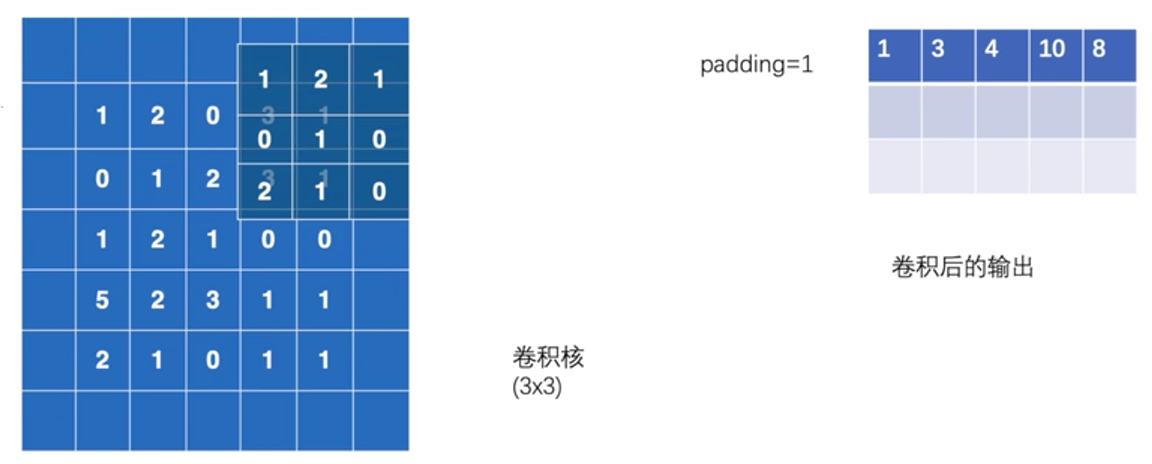
【padding=1表示原input图像,上下左右各添加一个空白行(列),值为0】
代码如下:
点击查看代码
#应用conv2d(其他代码同上)
#import torch.nn.functional as F
#增加padding参数
output3 = F.conv2d(input,kernel,stride=1,padding=1)
print(output3)
输出结果如下:
点击查看代码
#输出结果如下:
tensor([[[[ 1,  3,  4, 10,  8],[ 5, 10, 12, 12,  6],[ 7, 18, 16, 16,  8],[11, 13,  9,  3,  4],[14, 13,  9,  7,  4]]]])
输出结果为tensor类型的5*5矩阵,明显尺寸变大
如图,原始图像因为padding=1的设置,变成了7*7的矩阵: