
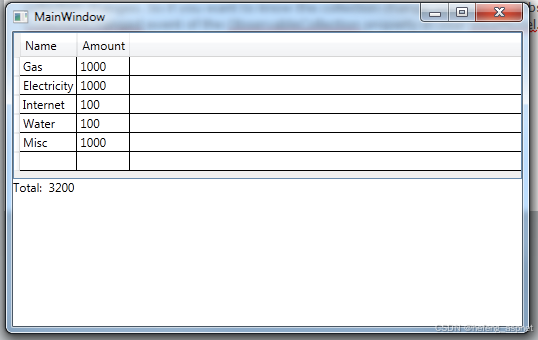
这里我们都知道 WPF Datagrid 总在末尾带有额外的列,故而很多人问为什么 Datagrid 中会展示额外的列,例如:DB(数据库)表或模型类具备 5 列,但在源添加列后显示 6 列,没有标题。
这里,Datagrid 是 WPF 框架中的一个 XAML 控件,DataGrid 本身无法显示列数,因此每次传递 itemsource 值后,它都会默认显现带有值的列。这个额外的列取决于它所引用的标题和列的宽度,而这恰恰是 DataGrid 的宽度分布。
若是您喜欢此文章,请收藏、点赞、评论,谢谢,祝您快乐每一天。
下面我将向您展示如何应对这个问题。
创建 WPF 应用程序
将 DataGridWindow.xaml 项目添加到项目中。
将 DataGrid 控件添加到新计划中
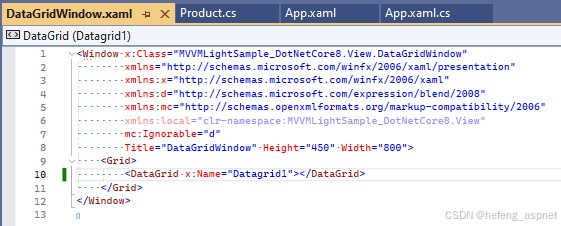
添加用于在 DataGrid 控件中展示数据的后端代码
namespace MVVMLightSample_DotNetCore8.View
{
/// <summary>
/// Interaction logic for DataGridWindow.xaml
/// </summary>
public partial class DataGridWindow : Window
{
public DataGridWindow()
{
InitializeComponent();
LoadData();
}
private void LoadData()
{
List<Product> product = new List<Product>();
product.Add(new Product { ProductID = 1, ProductName = "Laptop", ProductDescription = "Dell Laptop", ProductPrice = 50000, ProductStock = 10 });
product.Add(new Product { ProductID = 2, ProductName = "Mobile", ProductDescription = "Samsung Mobile", ProductPrice = 20000, ProductStock = 20 });
product.Add(new Product { ProductID = 3, ProductName = "Tablet", ProductDescription = "Lenovo Tablet", ProductPrice = 15000, ProductStock = 30 });
product.Add(new Product { ProductID = 4, ProductName = "Desktop", ProductDescription = "HP Desktop", ProductPrice = 40000, ProductStock = 40 });
product.Add(new Product { ProductID = 5, ProductName = "Printer", ProductDescription = "Canon Printer", ProductPrice = 10000, ProductStock = 50 });
product.Add(new Product { ProductID = 6, ProductName = "Scanner", ProductDescription = "Epson Scanner", ProductPrice = 8000, ProductStock = 60 });
product.Add(new Product { ProductID = 7, ProductName = "Keyboard", ProductDescription = "Logitech Keyboard", ProductPrice = 500, ProductStock = 70 });
product.Add(new Product { ProductID = 8, ProductName = "Mouse", ProductDescription = "Dell Mouse", ProductPrice = 300, ProductStock = 80 });
Datagrid1.ItemsSource = product;
}
}
}
现在构建项目,数据将填充 DataGrid 控件,但是,额外的列仍然显示在 DataGrid 内部,黄色突出显示区域。
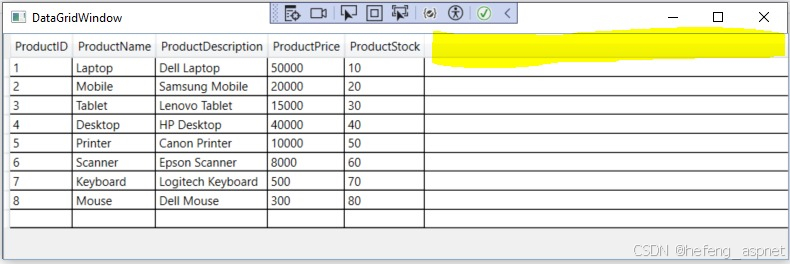
现在的问题是如何删除该多余的列。
在DataGridWindow.xaml的Xaml代码中,需要在DataGrid控件中添加一个小属性“ColumnWidth="*”。
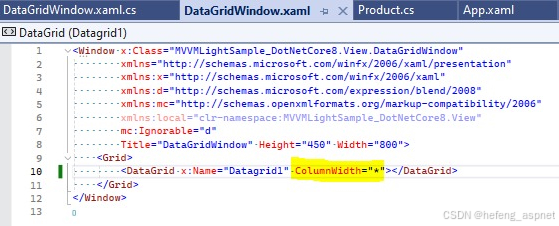
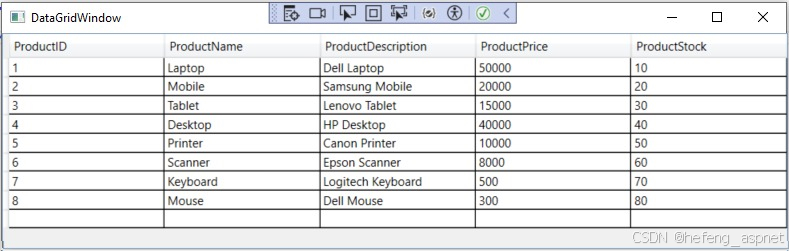
现在重新构建代码并执行。下面的窗口将显示多余的列已从 DataGrid 控件中删除,并且数据已完全填充到 DataGrid 中。
如果您喜欢此文章,请收藏、点赞、评论,谢谢,祝您快乐每一天。