SpringDataRedis
一、引入依赖
org.springframework.boot
spring-boot-starter-data-redis
org.apache.commons
commons-pool2
二、application.yml配置:我这里为集群配置
spring:
redis:
cluster:
nodes:
- 192.168.48.129:7001
- 192.168.48.129:7002
- 192.168.48.129:7003
- 192.168.48.129:7004
- 192.168.48.129:7005
- 192.168.48.129:7006
max-redirects: 3
lettuce:
pool:
max-active: 8
max-idle: 8
min-idle: 0
max-wait: 100
上述阶段测试生成的数据没有序列化有问题
三、SpringDataRedis的序列化方式
自定义RedisTemplate的序列化方式
package com.kmt.redisdemo.config;
import org.springframework.context.annotation.Bean;
import org.springframework.context.annotation.Configuration;
import org.springframework.data.redis.connection.RedisConnectionFactory;
import org.springframework.data.redis.core.RedisTemplate;
import org.springframework.data.redis.serializer.GenericJackson2JsonRedisSerializer;
import org.springframework.data.redis.serializer.RedisSerializer;
/**
* @Description:
* @Created:
* @author: 枯木堂
* @createTime:
**/
@Configuration
public class RedisConfig {
@Bean
public RedisTemplate redisTemplate(RedisConnectionFactory connectionFactory){
//创建redisTemplate的对象
RedisTemplate redisTemplate = new RedisTemplate<>();
//设置连接工厂
redisTemplate.setConnectionFactory(connectionFactory);
//创建json序列化工具
GenericJackson2JsonRedisSerializer jsonRedisSerializer = new GenericJackson2JsonRedisSerializer();
//设置key的序列化
redisTemplate.setKeySerializer(RedisSerializer.string());
redisTemplate.setHashKeySerializer(RedisSerializer.string());
//设置value的序列化
redisTemplate.setValueSerializer(jsonRedisSerializer);
redisTemplate.setHashValueSerializer(jsonRedisSerializer);
//返回
return redisTemplate;
}
}
上述序列化后能达到效果但是多增加了一个类信息,为了在反序列化时知道对象的类型,JSON序列化器会将类的class类型写入json结果中,存入Redis,会带来额外的内存开销。
四、StringRedisTemplate
为了节省内存空间,我们并不会使用JSON序列化器来处理value,而是统一使用String序列化器,要求只能存储String类型的key和value。当需要存储Java对象时,手动完成对象的序列化和反序列化。
Spring默认提供了一个StringRediTemplate类,它的key和value的序列化方式默认就是String方式。省去了我们自定义RedisTemplate的过程:
创建个User对象
package com.kmt.redisdemo.pojo;
import lombok.AllArgsConstructor;
import lombok.Data;
import lombok.NoArgsConstructor;
/**
* @Description:
* @Created:
* @author: 枯木堂
* @createTime:
**/
@Data
@AllArgsConstructor
@NoArgsConstructor
public class User {
private String name;
private Integer age;
}
使用StringRedisTemplate的测试类如下:
package com.kmt.redisdemo;
import com.fasterxml.jackson.core.JsonProcessingException;
import com.fasterxml.jackson.databind.ObjectMapper;
import com.kmt.redisdemo.pojo.User;
import org.junit.jupiter.api.Test;
import org.springframework.beans.factory.annotation.Autowired;
import org.springframework.boot.test.context.SpringBootTest;
import org.springframework.data.redis.core.RedisTemplate;
import org.springframework.data.redis.core.StringRedisTemplate;
@SpringBootTest
class RedisStringTests {
@Autowired
private StringRedisTemplate stringRedisTemplate;
@Test
void testString(){
stringRedisTemplate.opsForValue().set("name","枯木堂");
Object name = stringRedisTemplate.opsForValue().get("name");
System.out.println("name:"+name);
}
private static final ObjectMapper mapper = new ObjectMapper();
@Test
void testSaveUser() throws JsonProcessingException {
//创建User对象
User user = new User("枯木堂", 20);
//手动序列化
String json = mapper.writeValueAsString(user);
//写入数据
stringRedisTemplate.opsForValue().set("user:100",json);
//获取数据
String jsonUser = stringRedisTemplate.opsForValue().get("user:100");
//手动反序列化
User user1 = mapper.readValue(jsonUser, User.class);
System.out.println("user1:"+user1);
}
}
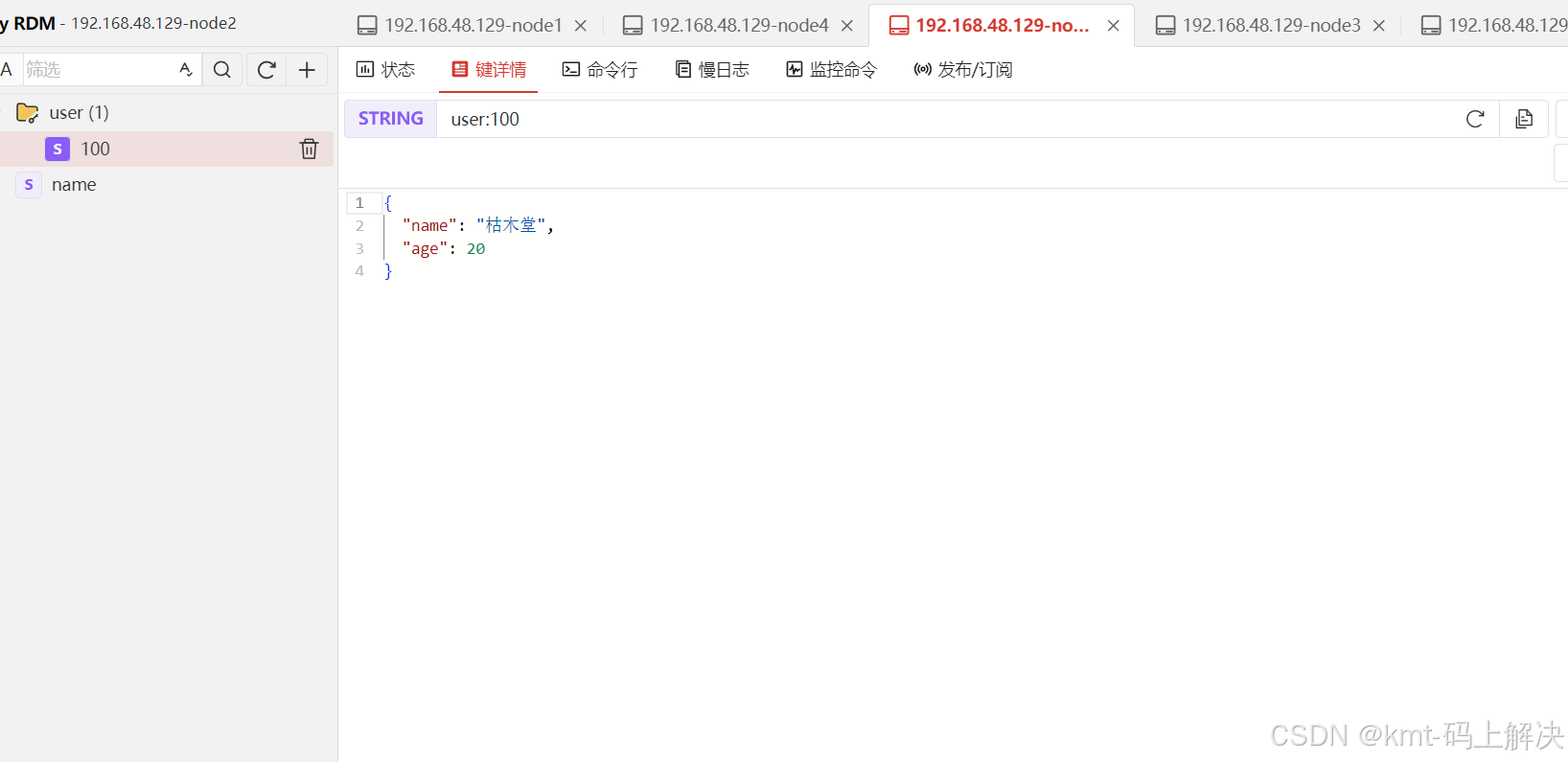
五、查看redis中的存储信息