CNN+MNIST - 实践
part0: virtual environment
Ah! Got it — when you create a Python virtual environment, it won’t be used automatically. You need to activate it so your terminal session uses the Python and packages from that environment instead of the system Python.
Step 1: Create a Virtual Environment (if not done yet)
python3 -m venv ~/torch-env- This creates a folder
torch-envin your home directory. - Inside it, Python, pip, and site-packages are isolated from the system.
Step 2: Activate the Virtual Environment
On Linux / macOS:
source ~/torch-env/bin/activate- After this, your shell prompt will usually change to something like:
(torch-env) user@machine:~$- Now, when you run
pythonorpip, it uses the virtual environment’s Python and packages.
On Windows (Command Prompt):
C:\> C:\Users\YourName\torch-env\Scripts\activate.batOn Windows (PowerShell):
PS C:\> C:\Users\YourName\torch-env\Scripts\Activate.ps1Step 3: Install Packages Inside the Virtual Environment
Once activated:
pip install torch torchvision matplotlib- These packages are installed only in the virtual environment, not system Python.
Step 4: Run Your Script
python cnn_mnist.py- This will now use the Python interpreter and packages from the virtual environment.
Step 5: Deactivate When Done
deactivate- This returns your shell to the system Python.
Tip: You must activate the venv every time you open a new terminal and want to run your project.
If you want, I can give you a one-command guide that sets up the virtual environment, installs PyTorch, and runs your MNIST CNN script so you can get started in one go.
part1: CNN
Perfect timing ! Let’s start from scratch and build your first Convolutional Neural Network (CNN) step by step.
We’ll use PyTorch (one of the easiest and most popular deep learning frameworks).
Since you’re a beginner, we’ll work on the MNIST dataset (handwritten digits 0–9).
Step 1: Install Dependencies
Make sure you have PyTorch installed. If not, run:
pip install torch torchvision matplotlibStep 2: Import Libraries
import torch
import torch.nn as nn
import torch.optim as optim
import torch.nn.functional as F
from torchvision import datasets, transforms
from torch.utils.data import DataLoader
import matplotlib.pyplot as plt
Step 3: Load Dataset (MNIST)
# Transform: convert images to tensor + normalize
transform = transforms.Compose([
transforms.ToTensor(),
transforms.Normalize((0.5,), (0.5,))
])
# Download MNIST dataset (training + test)
train_dataset = datasets.MNIST(root='./data', train=True, download=True, transform=transform)
test_dataset = datasets.MNIST(root='./data', train=False, download=True, transform=transform)
train_loader = DataLoader(train_dataset, batch_size=64, shuffle=True)
test_loader = DataLoader(test_dataset, batch_size=1000, shuffle=False)- MNIST: dataset of 28x28 grayscale images of digits (0–9).
train_loader: batches of 64 images for training.test_loader: batches of 1000 images for evaluation.
Step 4: Define Your CNN
Here’s a very simple CNN:
class SimpleCNN
(nn.Module):
def __init__(self):
super(SimpleCNN, self).__init__()
# 1 input channel (grayscale), 32 filters of size 3x3
self.conv1 = nn.Conv2d(1, 32, kernel_size=3, padding=1)
self.conv2 = nn.Conv2d(32, 64, kernel_size=3, padding=1)
self.pool = nn.MaxPool2d(2, 2)
self.fc1 = nn.Linear(64*7*7, 128) # fully connected layer
self.fc2 = nn.Linear(128, 10) # 10 classes (digits 0-9)
def forward(self, x):
x = self.pool(F.relu(self.conv1(x))) # Conv1 + ReLU + Pool
x = self.pool(F.relu(self.conv2(x))) # Conv2 + ReLU + Pool
x = x.view(-1, 64*7*7) # Flatten
x = F.relu(self.fc1(x)) # Fully connected
x = self.fc2(x) # Output layer
return x
Step 5: Train the CNN
device = torch.device("cuda" if torch.cuda.is_available() else "cpu")
model = SimpleCNN().to(device)
criterion = nn.CrossEntropyLoss()
optimizer = optim.Adam(model.parameters(), lr=0.001)
# Training loop
for epoch in range(5): # 5 epochs
model.train()
for images, labels in train_loader:
images, labels = images.to(device), labels.to(device)
optimizer.zero_grad()
outputs = model(images)
loss = criterion(outputs, labels)
loss.backward()
optimizer.step()
print(f"Epoch {epoch+1
}, Loss: {loss.item():.4f
}")
Step 6: Test the CNN
model.eval()
correct = 0
total = 0
with torch.no_grad():
for images, labels in test_loader:
images, labels = images.to(device), labels.to(device)
outputs = model(images)
_, predicted = torch.max(outputs, 1)
total += labels.size(0)
correct += (predicted == labels).sum().item()
print(f"Accuracy on test dataset: {
100 * correct / total:.2f
}%")
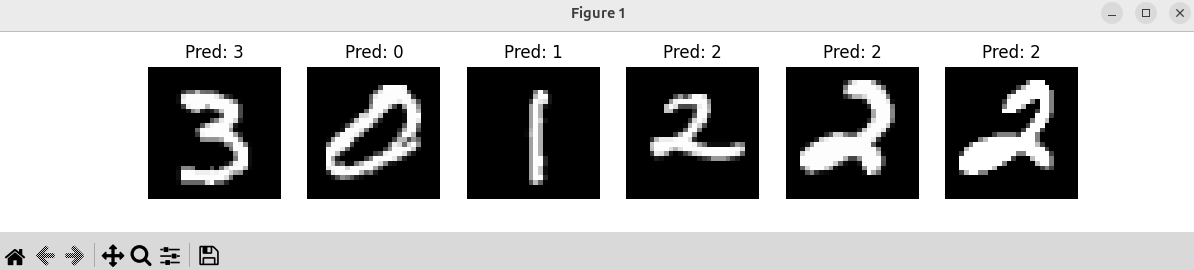
Step 7: Visualize Predictions
examples = enumerate(test_loader)
batch_idx, (images, labels) = next(examples)
outputs = model(images.to(device))
_, preds = torch.max(outputs, 1)
# Show first 6 images with predictions
fig, axes = plt.subplots(1, 6, figsize=(12, 2))
for i in range(6):
axes[i].imshow(images[i][0], cmap="gray")
axes[i].set_title(f"Pred: {preds[i].item()
}")
axes[i].axis("off")
plt.show()
✅ What You Just Built
- A CNN with 2 convolutional layers + pooling + fully connected layers.
- Trained it on MNIST (handwritten digits).
- Achieved ~98% accuracy in just 5 epochs .
- Visualized predictions on test images.
part2: all in one .py file
Got it ✅! I’ll give you one complete Python file that includes:
- Dataset loading
- CNN definition
- Training
- Testing
- Visualization of predictions
This script is self-contained — you can just python cnn_mnist.py and it will run end-to-end .
#!/usr/bin/env python3
"""
Simple CNN on MNIST dataset with PyTorch
Steps: Load dataset -> Define CNN -> Train -> Test -> Visualize
"""
import torch
import torch.nn as nn
import torch.optim as optim
import torch.nn.functional as F
from torchvision import datasets, transforms
from torch.utils.data import DataLoader
import matplotlib.pyplot as plt
# -------------------
# 1. Define CNN
# -------------------
class SimpleCNN
(nn.Module):
def __init__(self):
super(SimpleCNN, self).__init__()
self.conv1 = nn.Conv2d(1, 32, kernel_size=3, padding=1) # 1x28x28 -> 32x28x28
self.conv2 = nn.Conv2d(32, 64, kernel_size=3, padding=1) # 32x14x14 -> 64x14x14
self.pool = nn.MaxPool2d(2, 2) # downsample
self.fc1 = nn.Linear(64*7*7, 128)
self.fc2 = nn.Linear(128, 10) # 10 classes (digits)
def forward(self, x):
x = self.pool(F.relu(self.conv1(x)))
x = self.pool(F.relu(self.conv2(x)))
x = x.view(-1, 64*7*7)
x = F.relu(self.fc1(x))
x = self.fc2(x)
return x
# -------------------
# 2. Load Dataset
# -------------------
def load_data():
transform = transforms.Compose([
transforms.ToTensor(),
transforms.Normalize((0.5,), (0.5,))
])
train_dataset = datasets.MNIST(root='./data', train=True, download=True, transform=transform)
test_dataset = datasets.MNIST(root='./data', train=False, download=True, transform=transform)
train_loader = DataLoader(train_dataset, batch_size=64, shuffle=True)
test_loader = DataLoader(test_dataset, batch_size=1000, shuffle=False)
return train_loader, test_loader
# -------------------
# 3. Train CNN
# -------------------
def train_model(model, device, train_loader, optimizer, criterion, epochs=5):
model.train()
for epoch in range(epochs):
for images, labels in train_loader:
images, labels = images.to(device), labels.to(device)
optimizer.zero_grad()
outputs = model(images)
loss = criterion(outputs, labels)
loss.backward()
optimizer.step()
print(f"Epoch {epoch+1
}/{epochs
}, Loss: {loss.item():.4f
}")
# -------------------
# 4. Test CNN
# -------------------
def test_model(model, device, test_loader):
model.eval()
correct, total = 0, 0
with torch.no_grad():
for images, labels in test_loader:
images, labels = images.to(device), labels.to(device)
outputs = model(images)
_, predicted = torch.max(outputs, 1)
total += labels.size(0)
correct += (predicted == labels).sum().item()
accuracy = 100 * correct / total
print(f"Test Accuracy: {accuracy:.2f
}%")
return accuracy
# -------------------
# 5. Visualize Predictions
# -------------------
def visualize_predictions(model, device, test_loader):
model.eval()
examples = enumerate(test_loader)
_, (images, labels) = next(examples)
outputs = model(images.to(device))
_, preds = torch.max(outputs, 1)
fig, axes = plt.subplots(1, 6, figsize=(12, 2))
for i in range(6):
axes[i].imshow(images[i][0], cmap="gray")
axes[i].set_title(f"Pred: {preds[i].item()
}")
axes[i].axis("off")
plt.show()
# -------------------
# 6. Main
# -------------------
def main():
device = torch.device("cuda" if torch.cuda.is_available() else "cpu")
print(f"Using device: {device
}")
train_loader, test_loader = load_data()
model = SimpleCNN().to(device)
criterion = nn.CrossEntropyLoss()
optimizer = optim.Adam(model.parameters(), lr=0.001)
train_model(model, device, train_loader, optimizer, criterion, epochs=5)
test_model(model, device, test_loader)
visualize_predictions(model, device, test_loader)
if __name__ == "__main__":
main()
How to Run
Save this as
cnn_mnist.py.Run:
python cnn_mnist.pyYou’ll see:
- Training loss per epoch.
- Test accuracy (~98%).
- A plot of sample test images with predicted labels.
part3: save the trained CNN
Perfect! Let’s extend your MNIST CNN script so it saves the trained model and also provides a loading function that can later be used in a ROS2 node for real-time inference.
Here’s a full .py file that includes training, testing, saving, and loading:
#!/usr/bin/env python3
"""
CNN on MNIST with saving/loading for ROS2 integration
"""
import torch
import torch.nn as nn
import torch.optim as optim
import torch.nn.functional as F
from torchvision import datasets, transforms
from torch.utils.data import DataLoader
import matplotlib.pyplot as plt
import os
# -------------------
# 1. Define CNN
# -------------------
class SimpleCNN
(nn.Module):
def __init__(self):
super(SimpleCNN, self).__init__()
self.conv1 = nn.Conv2d(1, 32, kernel_size=3, padding=1)
self.conv2 = nn.Conv2d(32, 64, kernel_size=3, padding=1)
self.pool = nn.MaxPool2d(2, 2)
self.fc1 = nn.Linear(64*7*7, 128)
self.fc2 = nn.Linear(128, 10)
def forward(self, x):
x = self.pool(F.relu(self.conv1(x)))
x = self.pool(F.relu(self.conv2(x)))
x = x.view(-1, 64*7*7)
x = F.relu(self.fc1(x))
x = self.fc2(x)
return x
# -------------------
# 2. Load MNIST dataset
# -------------------
def load_data():
transform = transforms.Compose([
transforms.ToTensor(),
transforms.Normalize((0.5,), (0.5,))
])
train_dataset = datasets.MNIST(root='./data', train=True, download=True, transform=transform)
test_dataset = datasets.MNIST(root='./data', train=False, download=True, transform=transform)
train_loader = DataLoader(train_dataset, batch_size=64, shuffle=True)
test_loader = DataLoader(test_dataset, batch_size=1000, shuffle=False)
return train_loader, test_loader
# -------------------
# 3. Train CNN
# -------------------
def train_model(model, device, train_loader, optimizer, criterion, epochs=5):
model.train()
for epoch in range(epochs):
for images, labels in train_loader:
images, labels = images.to(device), labels.to(device)
optimizer.zero_grad()
outputs = model(images)
loss = criterion(outputs, labels)
loss.backward()
optimizer.step()
print(f"Epoch {epoch+1
}/{epochs
}, Loss: {loss.item():.4f
}")
# -------------------
# 4. Test CNN
# -------------------
def test_model(model, device, test_loader):
model.eval()
correct, total = 0, 0
with torch.no_grad():
for images, labels in test_loader:
images, labels = images.to(device), labels.to(device)
outputs = model(images)
_, predicted = torch.max(outputs, 1)
total += labels.size(0)
correct += (predicted == labels).sum().item()
accuracy = 100 * correct / total
print(f"Test Accuracy: {accuracy:.2f
}%")
return accuracy
# -------------------
# 5. Visualize Predictions
# -------------------
def visualize_predictions(model, device, test_loader):
model.eval()
examples = enumerate(test_loader)
_, (images, labels) = next(examples)
outputs = model(images.to(device))
_, preds = torch.max(outputs, 1)
fig, axes = plt.subplots(1, 6, figsize=(12, 2))
for i in range(6):
axes[i].imshow(images[i][0], cmap="gray")
axes[i].set_title(f"Pred: {preds[i].item()
}")
axes[i].axis("off")
plt.show()
# -------------------
# 6. Save and Load Model
# -------------------
def save_model(model, path='cnn_mnist.pth'):
torch.save(model.state_dict(), path)
print(f"Model saved to {path
}")
def load_model(model, path='cnn_mnist.pth', device='cpu'):
model.load_state_dict(torch.load(path, map_location=device))
model.to(device)
model.eval()
print(f"Model loaded from {path
}")
# -------------------
# 7. Main
# -------------------
def main():
device = torch.device("cuda" if torch.cuda.is_available() else "cpu")
print(f"Using device: {device
}")
train_loader, test_loader = load_data()
model = SimpleCNN().to(device)
criterion = nn.CrossEntropyLoss()
optimizer = optim.Adam(model.parameters(), lr=0.001)
# Train the model
train_model(model, device, train_loader, optimizer, criterion, epochs=5)
# Test accuracy
test_model(model, device, test_loader)
# Visualize predictions
visualize_predictions(model, device, test_loader)
# Save model
save_model(model, path='cnn_mnist.pth')
# Example: Load the model back (for ROS2 or inference)
loaded_model = SimpleCNN()
load_model(loaded_model, path='cnn_mnist.pth', device=device)
if __name__ == "__main__":
main()
✅ What This Script Does:
- Trains a simple CNN on MNIST.
- Tests accuracy.
- Shows a few predictions with
matplotlib. - Saves the trained model to
cnn_mnist.pth. - Demonstrates loading the saved model, which you can later use in a ROS2 node for real-time inference.
part4: reuse the trained model
Got it! If you just want to do a quick test of the trained CNN without retraining, you can load cnn_mnist.pth and run inference on the test dataset. Here’s a minimal “fast test” script:
#!/usr/bin/env python3
"""
Fast test of trained MNIST CNN
"""
import torch
from torchvision import datasets, transforms
from torch.utils.data import DataLoader
import matplotlib.pyplot as plt
from cnn_mnist import SimpleCNN, load_model # Assuming cnn_mnist.py is in the same folder
# -------------------
# 1. Setup
# -------------------
device = torch.device("cuda" if torch.cuda.is_available() else "cpu")
print(f"Using device: {device
}")
# Load test dataset
transform = transforms.Compose([
transforms.ToTensor(),
transforms.Normalize((0.5,), (0.5,))
])
test_dataset = datasets.MNIST(root='./data', train=False, download=True, transform=transform)
test_loader = DataLoader(test_dataset, batch_size=1000, shuffle=False)
# -------------------
# 2. Load model
# -------------------
model = SimpleCNN()
load_model(model, path='cnn_mnist.pth', device=device)
# -------------------
# 3. Quick test accuracy
# -------------------
model.eval()
correct, total = 0, 0
with torch.no_grad():
for images, labels in test_loader:
images, labels = images.to(device), labels.to(device)
outputs = model(images)
_, predicted = torch.max(outputs, 1)
total += labels.size(0)
correct += (predicted == labels).sum().item()
accuracy = 100 * correct / total
print(f"Test Accuracy: {accuracy:.2f
}%")
# -------------------
# 4. Visualize first few predictions
# -------------------
examples = enumerate(test_loader)
_, (images, labels) = next(examples)
outputs = model(images.to(device))
_, preds = torch.max(outputs, 1)
fig, axes = plt.subplots(1, 6, figsize=(12, 2))
for i in range(6):
axes[i].imshow(images[i][0], cmap="gray")
axes[i].set_title(f"Pred: {preds[i].item()
}")
axes[i].axis("off")
plt.show()
How to Run Fast Test
- Make sure
cnn_mnist.pthexists in the same folder. - Save the script as
fast_test.py. - Run:
python fast_test.py✅ What This Does
- Loads the saved model (
cnn_mnist.pth). - Computes accuracy on the test dataset (~98%).
- Shows a few sample predictions.
No training happens, so it’s very fast.
part5: shuffle
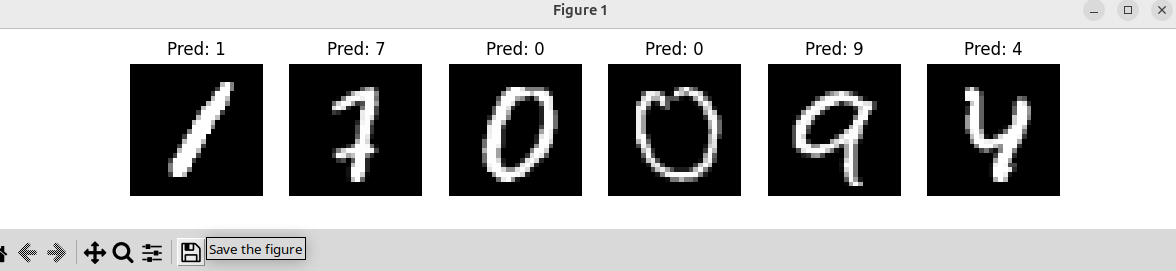
Ah! That happens because in your visualization code, you are always taking the first batch from the test loader:
examples = enumerate(test_loader)
_, (images, labels) = next(examples)test_loaderalways returns batches in the same order unless you shuffle it.- By calling
next(examples)you are only grabbing the first batch every time, so the 6 images you plot are always the same.
How to fix it
Option 1: Shuffle the test loader
test_loader = DataLoader(test_dataset, batch_size=1000, shuffle=True)- Now every time you iterate over it, the batches come in a different order.
- The first 6 images plotted will likely be different each run.
Note: If you want reproducibility in testing, normally
shuffle=Falseis used, but for visualization you can temporarily setshuffle=True.
Option 2: Pick random indices from the dataset
import random
# Pick 6 random images from test dataset
indices = random.sample(range(len(test_dataset)), 6)
images = torch.stack([test_dataset[i][0] for i in indices])
labels = torch.tensor([test_dataset[i][1] for i in indices])
# Run inference
outputs = model(images.to(device))
_, preds = torch.max(outputs, 1)
# Plot
fig, axes = plt.subplots(1, 6, figsize=(12, 2))
for i in range(6):
axes[i].imshow(images[i][0], cmap="gray")
axes[i].set_title(f"Pred: {preds[i].item()
}")
axes[i].axis("off")
plt.show()- This randomly selects 6 different images every time.
- Great for testing different predictions each run.