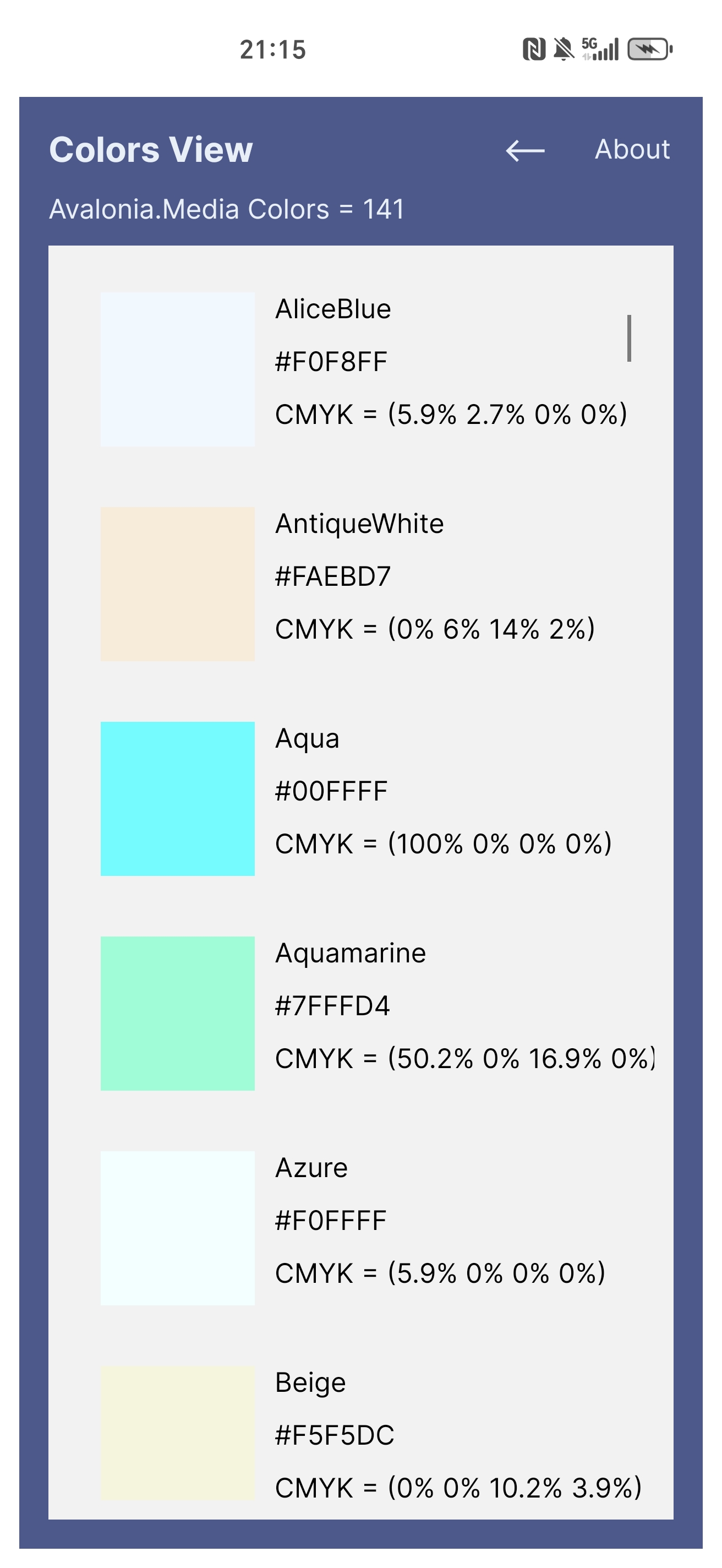
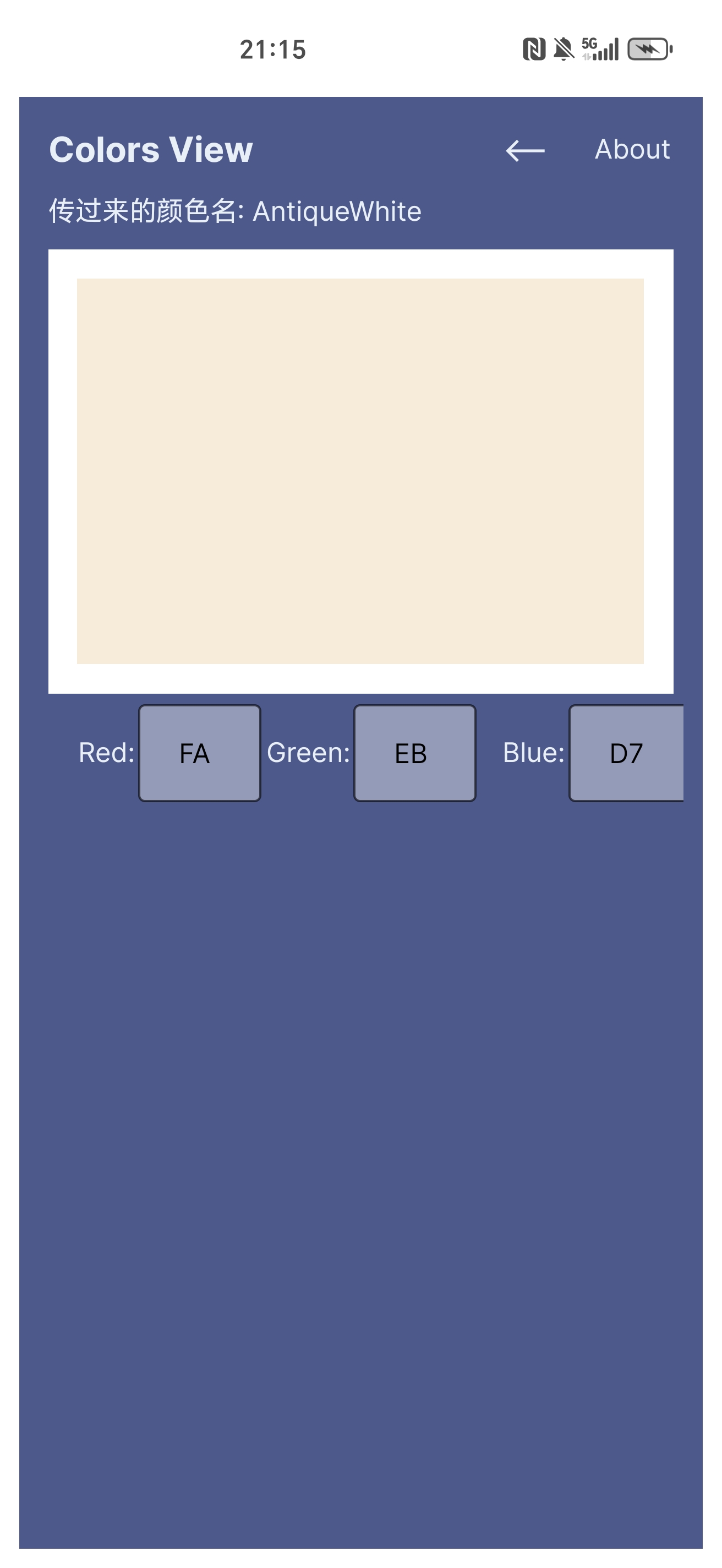
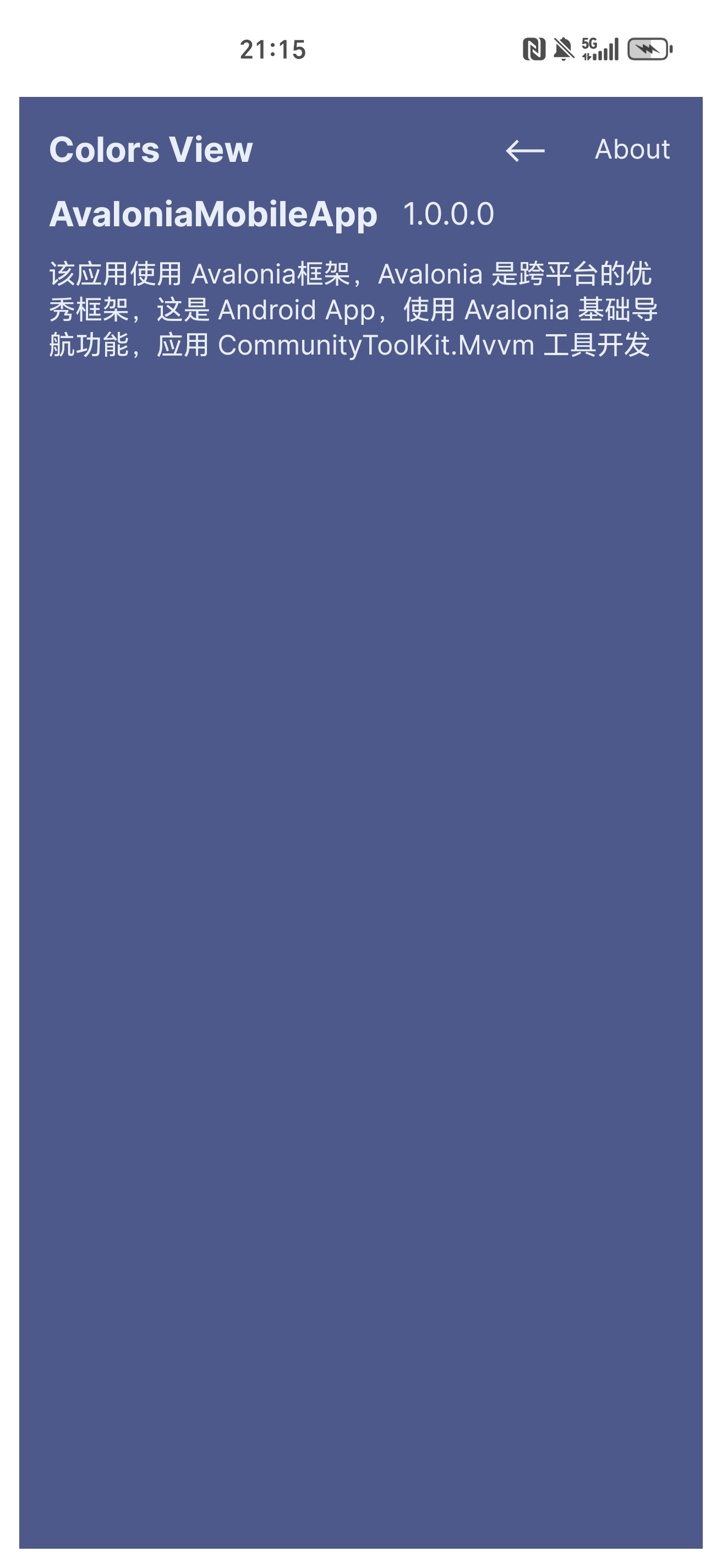
我把成功开发Android应用的经过记录下来,在开发过程中,模拟器经常出问题,将Java Development Kit的位置和Android SDK的位置改动一下,就解决了模拟器报错的问题,这是在Github上看到的解决办法。
先建Models文件夹,创建模型ColorItem.cs文件。
using Avalonia.Media;namespace AvaloniaMobileApp.Models
{public class ColorItem{public Color? Color { get; set; }public string? ColorName {  get; set; }}
}
再创建ColorItemMessage记录,用于在viewmodel间传递参数。
namespace AvaloniaMobileApp.Models
{public  record ColorItemMessage(string Sender,ColorItem Item);    }
先前用ReactiveUI写移动应用,结果闪退了,换用Communitytoolkit.mvvm社区工具,所以将ViewModelBase.cs继承 ObservableRecipient。
using CommunityToolkit.Mvvm.ComponentModel;namespace AvaloniaMobileApp.ViewModels;public abstract class ViewModelBase : ObservableRecipient
{
}
在ViewModels文件夹下先创建要展示的页面ViewModel,ColorsViewModel.cs,AboutViewModel.cs,PalletteViewModel.cs。
ColorsViewModel.cs
using Avalonia.Data.Converters;
using Avalonia.Media;
using AvaloniaMobileApp.Models;
using CommunityToolkit.Mvvm.ComponentModel;
using CommunityToolkit.Mvvm.Input;
using CommunityToolkit.Mvvm.Messaging;
using System;
using System.Collections.ObjectModel;
using System.Reflection;
using System.Threading.Tasks;namespace AvaloniaMobileApp.ViewModels
{public partial class ColorsViewModel : ViewModelBase{public ObservableCollection<ColorItem> Colors { get; }public ColorsViewModel(){Colors = [];}[ObservableProperty]private ColorItem _selectedColorItem = new();partial void OnSelectedColorItemChanged(ColorItem value){IsActive = true;WeakReferenceMessenger.Default.Send(new ColorItemMessage("colors", value));}[RelayCommand]private Task Init(){if (Colors.Count > 0){return Task.CompletedTask;}var properties = typeof(Colors).GetProperties(BindingFlags.Public | BindingFlags.Static);foreach (var property in properties){if (property.GetValue(null) is Color color){Colors.Add(new ColorItem{Color = color,ColorName = property.Name});}}return Task.CompletedTask;}public static FuncValueConverter<Color, string> ColorToHex => new(color =>{return $"#{color.R:X2}{color.G:X2}{color.B:X2}";});public static FuncValueConverter<Color, string> ColorToCMYK => new(value =>{if (value is Color color){double r = color.R / 255.0;double g = color.G / 255.0;double b = color.B / 255.0;double k = 1 - Math.Max(Math.Max(r, g), b);double c = k < 1 ? (1 - r - k) / (1 - k) : 0;double m = k < 1 ? (1 - g - k) / (1 - k) : 0;double y = k < 1 ? (1 - b - k) / (1 - k) : 0;return $"CMYK = ({Math.Round(c*100,1)}% {Math.Round(m*100,1)}% {Math.Round(y*100,1)}% {Math.Round(k*100,1)}%)";}else{return "";}});}
}
AboutViewModel.cs
using System.Reflection;namespace AvaloniaMobileApp.ViewModels
{public class AboutViewModel : ViewModelBase{public string? AppName => Assembly.GetExecutingAssembly().GetName().Name;public string? Version => Assembly.GetExecutingAssembly().GetName().Version!.ToString();public string? Message => $"该应用使用 Avalonia框架,Avalonia 是跨平台的优秀框架,这是 Android App,使用 Avalonia 基础导航功能,应用 CommunityToolKit.Mvvm 工具开发";}
}
PalletteViewModel.cs
using Avalonia.Media;
using AvaloniaMobileApp.Models;
using CommunityToolkit.Mvvm.ComponentModel;
using CommunityToolkit.Mvvm.Messaging;namespace AvaloniaMobileApp.ViewModels
{public partial class PalletteViewModel : ViewModelBase, IRecipient<ColorItemMessage>{[ObservableProperty]private Color? _colorType;[ObservableProperty]private ColorItem? _colorItem;public void Receive(ColorItemMessage message){            if(message.Sender == "main"){ColorType = message.Item.Color;ColorItem = message.Item;Red = message.Item.Color!.Value.R;Green = message.Item.Color.Value.G;Blue = message.Item.Color.Value.B;}}public PalletteViewModel(){IsActive = true;}[ObservableProperty]private byte red;[ObservableProperty]private byte green;[ObservableProperty]private byte blue;private void UpdateColorType(){ColorType = Color.FromRgb((byte)Red, (byte)Green, (byte)Blue);}partial void OnRedChanged(byte value) => UpdateColorType(); partial void OnGreenChanged(byte value) => UpdateColorType();partial void OnBlueChanged(byte value) => UpdateColorType();}
}
更改MainViewModel.cs
using AvaloniaMobileApp.Models;
using CommunityToolkit.Mvvm.ComponentModel;
using CommunityToolkit.Mvvm.Input;
using CommunityToolkit.Mvvm.Messaging;
using Microsoft.Extensions.DependencyInjection;
using System.Threading.Tasks;namespace AvaloniaMobileApp.ViewModels;public partial class MainViewModel : ViewModelBase, IRecipient<ColorItemMessage>
{[ObservableProperty]   private ViewModelBase? _currentPage;[ObservableProperty]private ColorItem _selectedColorItem = new();public MainViewModel(){CurrentPage = App.Current.Services?.GetService<ColorsViewModel>();IsActive = true;}public void Receive(ColorItemMessage message){if(message.Sender == "colors"){SelectedColorItem = message.Item;GotoPalletteCommand.Execute(null);}      }[RelayCommand]private Task GotoAbout(){if(CurrentPage is not AboutViewModel){CurrentPage = App.Current.Services?.GetService<AboutViewModel>();}return Task.CompletedTask;}[RelayCommand]private Task GotoHome(){if(CurrentPage is not ColorsViewModel){CurrentPage = App.Current.Services?.GetService<ColorsViewModel>();}return Task.CompletedTask;}[RelayCommand]private Task GotoPallette(){if (CurrentPage is not PalletteViewModel){CurrentPage = App.Current.Services!.GetService<PalletteViewModel>();WeakReferenceMessenger.Default.Send(new ColorItemMessage("main", SelectedColorItem));}return Task.CompletedTask;}
}
创建要展示的Views,ColorsView.axaml。
<UserControl xmlns="https://github.com/avaloniaui"xmlns:x="http://schemas.microsoft.com/winfx/2006/xaml"xmlns:d="http://schemas.microsoft.com/expression/blend/2008"xmlns:mc="http://schemas.openxmlformats.org/markup-compatibility/2006"xmlns:vm="using:AvaloniaMobileApp.ViewModels"xmlns:models="using:AvaloniaMobileApp.Models"xmlns:b="using:AvaloniaMobileApp.Behaviors"x:DataType="vm:ColorsViewModel"b:LoadedBehavior.ExecuteCommand="{Binding InitCommand}"mc:Ignorable="d" d:DesignWidth="800" d:DesignHeight="450"x:Class="AvaloniaMobileApp.Views.ColorsView">	<Grid RowDefinitions="Auto,*,auto"><TextBlock Text="{Binding Colors.Count,StringFormat='Avalonia.Media Colors = {0}'}" Grid.Row="0"/><ListBox x:Name="ColorsListBox" Grid.Row="1" ItemsSource="{Binding Colors}" SelectedItem="{Binding SelectedColorItem}"><ListBox.ItemTemplate><DataTemplate x:DataType="models:ColorItem"><StackPanel Orientation="Horizontal"><Rectangle Height="80" Width="80"><Rectangle.Fill><SolidColorBrush Color="{Binding Color}"/></Rectangle.Fill></Rectangle><StackPanel><TextBlock Text="{Binding ColorName}"/><TextBlock Text="{Binding Color,Converter={x:Static vm:ColorsViewModel.ColorToHex}}"/><TextBlock Text="{Binding Color,Converter={x:Static vm:ColorsViewModel.ColorToCMYK}}"/></StackPanel></StackPanel></DataTemplate></ListBox.ItemTemplate></ListBox>	  </Grid>
</UserControl>
由于在代码中应用了这二行代码,导致xaml设计器报错。
<TextBlock Text="{Binding Color,Converter={x:Static vm:ColorsViewModel.ColorToHex}}"/>
<TextBlock Text="{Binding Color,Converter={x:Static vm:ColorsViewModel.ColorToCMYK}}"/>
如果不介意的话,可以忽略,不影响运行,介意就改成IValueConverter。
AboutView.axaml
<UserControl xmlns="https://github.com/avaloniaui"xmlns:x="http://schemas.microsoft.com/winfx/2006/xaml"xmlns:d="http://schemas.microsoft.com/expression/blend/2008"xmlns:vm="using:AvaloniaMobileApp.ViewModels"xmlns:mc="http://schemas.openxmlformats.org/markup-compatibility/2006"mc:Ignorable="d" d:DesignWidth="800" d:DesignHeight="450"x:DataType="vm:AboutViewModel"x:Class="AvaloniaMobileApp.Views.AboutView"><Grid RowDefinitions="Auto,Auto"><StackPanel Orientation="Horizontal" Spacing="5" Grid.Row="0"><TextBlock x:Name="AppNameTextBlock" Text="{Binding AppName}" FontSize="18" FontWeight="Bold"/><TextBlock x:Name="VersionTextBlock" FontSize="16" Text="{Binding Version}"/></StackPanel><TextBlock x:Name="MessageTextBlock" Grid.Row="1" TextWrapping="Wrap" Text="{Binding Message}"/></Grid>
</UserControl>
Pallette.axaml
<UserControl xmlns="https://github.com/avaloniaui"xmlns:x="http://schemas.microsoft.com/winfx/2006/xaml"xmlns:d="http://schemas.microsoft.com/expression/blend/2008"xmlns:mc="http://schemas.openxmlformats.org/markup-compatibility/2006"mc:Ignorable="d" d:DesignWidth="800" d:DesignHeight="450"xmlns:vm="using:AvaloniaMobileApp.ViewModels"x:DataType="vm:PalletteViewModel"xmlns:conv="using:AvaloniaMobileApp.Converter"x:Class="AvaloniaMobileApp.Views.PalletteView"><Grid RowDefinitions="Auto,Auto,Auto"><TextBlock Text="{Binding ColorItem.ColorName,StringFormat='传过来的颜色名: {0}'}" Grid.Row="0"/><Border Grid.Row="1" Background="White" Margin="5"><Rectangle HorizontalAlignment="Stretch" VerticalAlignment="Stretch" Height="200"><Rectangle.Fill><SolidColorBrush Color="{Binding ColorType}"/></Rectangle.Fill></Rectangle></Border><UniformGrid Columns="6" Grid.Row="2"><TextBlock Text="Red:" Grid.Column="0" HorizontalAlignment="Right"/><TextBox Watermark="16进制值" Text="{Binding Red,Converter={x:Static conv:ByteToString.Instance},UpdateSourceTrigger=LostFocus}"  Grid.Column="1"/><TextBlock Text="Green:" Grid.Column="2" HorizontalAlignment="Right"/><TextBox Watermark="16进制值" Text="{Binding Green,Converter={x:Static conv:ByteToString.Instance},UpdateSourceTrigger=LostFocus}" Grid.Column="3"/><TextBlock Text="Blue:" Grid.Column="4" HorizontalAlignment="Right"/><TextBox Watermark="16进制值" Text="{Binding Blue,Converter={x:Static conv:ByteToString.Instance},UpdateSourceTrigger=LostFocus}" Grid.Column="5"/></UniformGrid></Grid>
</UserControl>
MainView.axaml
<UserControl xmlns="https://github.com/avaloniaui"xmlns:x="http://schemas.microsoft.com/winfx/2006/xaml"xmlns:d="http://schemas.microsoft.com/expression/blend/2008"xmlns:mc="http://schemas.openxmlformats.org/markup-compatibility/2006"xmlns:vm="clr-namespace:AvaloniaMobileApp.ViewModels"mc:Ignorable="d" d:DesignWidth="800" d:DesignHeight="450"x:Class="AvaloniaMobileApp.Views.MainView"x:DataType="vm:MainViewModel"><Design.DataContext><!-- This only sets the DataContext for the previewer in an IDE,to set the actual DataContext for runtime, set the DataContext property in code (look at App.axaml.cs) --><vm:MainViewModel /></Design.DataContext><Border x:Name="MainBorder"><Grid RowDefinitions="Auto,*,Auto"><Grid ColumnDefinitions="*,Auto" Grid.Row="0"><TextBlock Text="Colors View" x:Name="TitleTextBlock" Grid.Column="0"/><StackPanel Grid.Column="1" Orientation="Horizontal" Spacing="10"><Button Command="{Binding GotoHomeCommand}" Content="<–" FontSize="18"/><Button Command="{Binding GotoAboutCommand}" Content="About"/></StackPanel></Grid> <TransitioningContentControl Grid.Row="1" Content="{Binding CurrentPage}"><TransitioningContentControl.PageTransition><CrossFade Duration="0:0:0.500"/></TransitioningContentControl.PageTransition></TransitioningContentControl> </Grid></Border>
</UserControl>
MainWindow.axaml文件不用动。
由于不能用ReactiveUI,就得写附加属性,将命令绑定到事件。
using Avalonia;
using Avalonia.Controls;
using Avalonia.Data;
using Avalonia.Interactivity;
using System.Windows.Input;namespace AvaloniaMobileApp.Behaviors
{public class LoadedBehavior : AvaloniaObject{static LoadedBehavior(){ExecuteCommandProperty.Changed.AddClassHandler<Interactive>(OnExecuteCommandChanged);}private static void OnExecuteCommandChanged(Interactive interactive, AvaloniaPropertyChangedEventArgs args){if (args.NewValue is ICommand command){interactive.AddHandler(Control.LoadedEvent, Handler);}else{interactive.RemoveHandler(Control.LoadedEvent, Handler);}}private static void Handler(object? sender, RoutedEventArgs e){if (sender is Interactive interactive){var command = interactive.GetValue(ExecuteCommandProperty);if (command?.CanExecute(null) == true){command.Execute(null);}}}public static readonly AttachedProperty<ICommand> ExecuteCommandProperty = AvaloniaProperty.RegisterAttached<LoadedBehavior, Interactive, ICommand>("ExecuteCommand", default, false, BindingMode.OneWay);public static ICommand GetExecuteCommand(AvaloniaObject obj){return obj.GetValue(ExecuteCommandProperty);}public static void SetExecuteCommand(AvaloniaObject obj, ICommand value){obj.SetValue(ExecuteCommandProperty, value);}}
}
在Converter文件夹下创建ByteToString.cs,将byte转换成string。
using Avalonia.Data;
using Avalonia.Data.Converters;
using System;
using System.Globalization;namespace AvaloniaMobileApp.Converter
{public class ByteToString : IValueConverter{public static readonly ByteToString Instance = new();public object? Convert(object? value, Type targetType, object? parameter, CultureInfo culture){if (value is byte b && targetType.IsAssignableTo(typeof(string))){return b.ToString("X2");}return new BindingNotification(new InvalidCastException(), BindingErrorType.Error);}public object? ConvertBack(object? value, Type targetType, object? parameter, CultureInfo culture){if(value is string str && targetType.IsAssignableTo(typeof(byte))){if(byte.TryParse(str,NumberStyles.HexNumber,CultureInfo.InvariantCulture,out var b)){return b;}return byte.MinValue;}return new BindingNotification(new InvalidCastException(), BindingErrorType.Error);}}
}
在App.axaml中编写样式。
<Application xmlns="https://github.com/avaloniaui"xmlns:x="http://schemas.microsoft.com/winfx/2006/xaml"xmlns:local="using:AvaloniaMobileApp"x:Class="AvaloniaMobileApp.App"RequestedThemeVariant="Default"><!-- "Default" ThemeVariant follows system theme variant. "Dark" or "Light" are other available options. --><Application.DataTemplates><local:ViewLocator/></Application.DataTemplates><Application.Resources><SolidColorBrush x:Key="PrimaryBackground">#4A598F</SolidColorBrush><SolidColorBrush x:Key="PrimaryForeground">#E8EFF7</SolidColorBrush>		</Application.Resources><Application.Styles><FluentTheme /><!--style--><Style Selector="Border#MainBorder"><Setter Property="Background" Value="{StaticResource PrimaryBackground}"/></Style><Style Selector="Border"><Setter Property="Padding" Value="10"/></Style><Style Selector="TextBlock"><Setter Property="Foreground" Value="{StaticResource PrimaryForeground}"/><Setter Property="Margin" Value="5"/><Setter Property="VerticalAlignment" Value="Center"/></Style><Style Selector="ListBox"><Setter Property="Margin" Value="5"/></Style><Style Selector="ListBox TextBlock"><Setter Property="Foreground" Value="Black"/></Style><Style Selector="TextBlock#TitleTextBlock"><Setter Property="FontSize" Value="18"/><Setter Property="FontWeight" Value="Bold"/></Style><Style Selector="Button"><Setter Property="Background" Value="Transparent"/><Setter Property="VerticalAlignment" Value="Center"/><Setter Property="Padding" Value="5"/></Style>		<Style Selector="Button /template/ ContentPresenter"><Setter Property="Foreground" Value="{StaticResource PrimaryForeground}"/></Style><Style Selector="Rectangle"><Setter Property="Margin" Value="5"/></Style></Application.Styles>
</Application>
在App.axaml.cs文件中使用ioc。
using Avalonia;
using Avalonia.Controls.ApplicationLifetimes;
using Avalonia.Data.Core.Plugins;
using Avalonia.Markup.Xaml;
using AvaloniaMobileApp.ViewModels;
using AvaloniaMobileApp.Views;
using Microsoft.Extensions.DependencyInjection;
using System;
using System.Linq;namespace AvaloniaMobileApp;public partial class App : Application
{public override void Initialize(){AvaloniaXamlLoader.Load(this);}public IServiceProvider? Services { get; private set; }public new static App Current => (App)Application.Current!;private IServiceProvider ConfigureServices(){var services = new ServiceCollection();services.AddTransient<AboutViewModel>();services.AddTransient<ColorsViewModel>();services.AddTransient<PalletteViewModel>();return services.BuildServiceProvider();}public override void OnFrameworkInitializationCompleted(){BindingPlugins.DataValidators.RemoveAt(0);Services = ConfigureServices();if (ApplicationLifetime is IClassicDesktopStyleApplicationLifetime desktop){// Avoid duplicate validations from both Avalonia and the CommunityToolkit. // More info: https://docs.avaloniaui.net/docs/guides/development-guides/data-validation#manage-validationpluginsDisableAvaloniaDataAnnotationValidation();desktop.MainWindow = new MainWindow{DataContext = new MainViewModel()};}else if (ApplicationLifetime is ISingleViewApplicationLifetime singleViewPlatform){singleViewPlatform.MainView = new MainView{DataContext = new MainViewModel()};}base.OnFrameworkInitializationCompleted();}private void DisableAvaloniaDataAnnotationValidation(){// Get an array of plugins to removevar dataValidationPluginsToRemove =BindingPlugins.DataValidators.OfType<DataAnnotationsValidationPlugin>().ToArray();// remove each entry foundforeach (var plugin in dataValidationPluginsToRemove){BindingPlugins.DataValidators.Remove(plugin);}}
}
将项目设为Android启动,存档,分发。
在我的荣耀手机Magic5 pro上成功运行。
效果展示。