
)
1.18.1数据库服务分布架构概述介绍
分布式架构理念:(基于业务逻辑分布式/基于程序逻辑分布式)
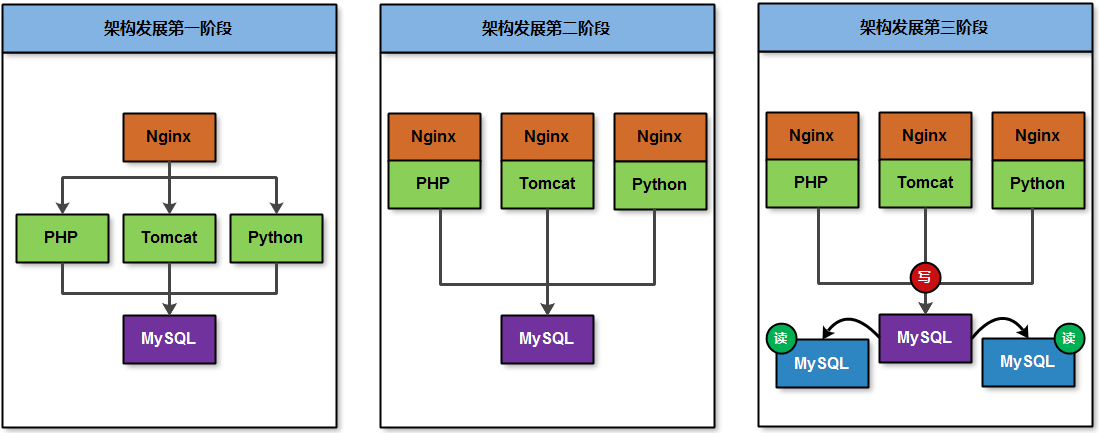
●架构演变过程早期,为了满足主要业务功能需求,可以将所有程序部署在一个服务器节点上;
·架构演变过程发展,为了满足主要业务压力增长,可以将所有程序拆分部署在不同服务器上;
●架构演变过程发展,为了满足主要业务安全稳定,可以将数据库设计成主从架构或读写分离;
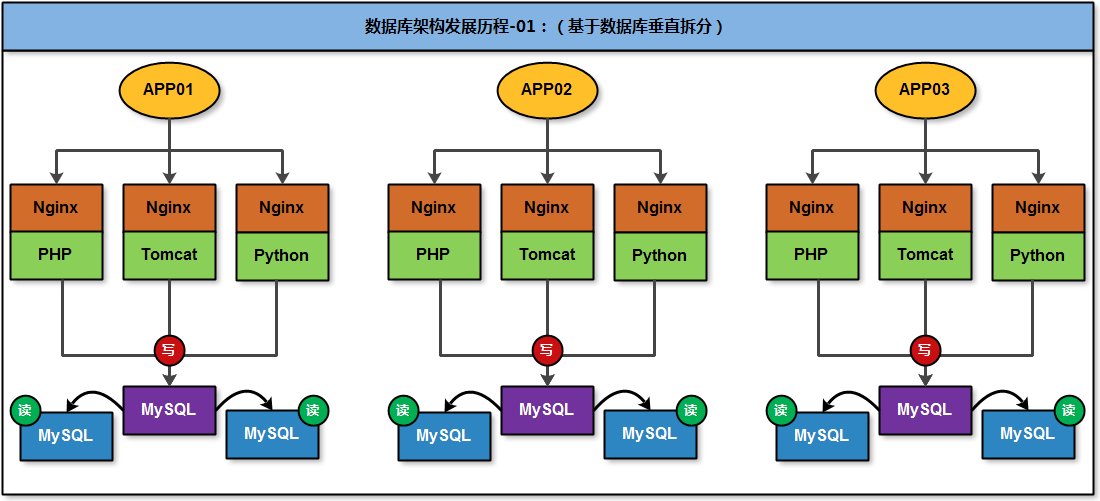
●架构演变过程发展,为了满足多个业务数量增加,可以将架构环境根据业务的情况独立拆分;
●架构演变过程发展,为了满足单独业务数量激增I可以将多个数据表进行拆分到多个节点上;(垂直拆分-MyCAT进行数据表信息整合)
●架构演变过程发展,为了满足单独业务数量激增,可以将单个数据表进行拆分到多个节点上;(水平拆分-MyCAT进行数据表信息整合)
●架构演变过程发展,为了满足业务的数据搜索业务需求、缓存业务需求、大数据业务分析需求,还要引入NOSQL或NewSQL数据库;
传统网站架构的发展变化历程
数据库存储架构发展变化历程


架构规划
需要连个虚拟主机,每个虚拟主机中需要有4个实例


基础环境操作命令
# 删除历史数据库环境
pkill mysqld
rm -rf /data/330*
mv /etc/my.cnf /etc/my.cnf.bak# 创建相关目录初始化数据
mkdir /data/33{07..10}/data -p && chown -R mysql.mysql /data/*
初始化命令。。。
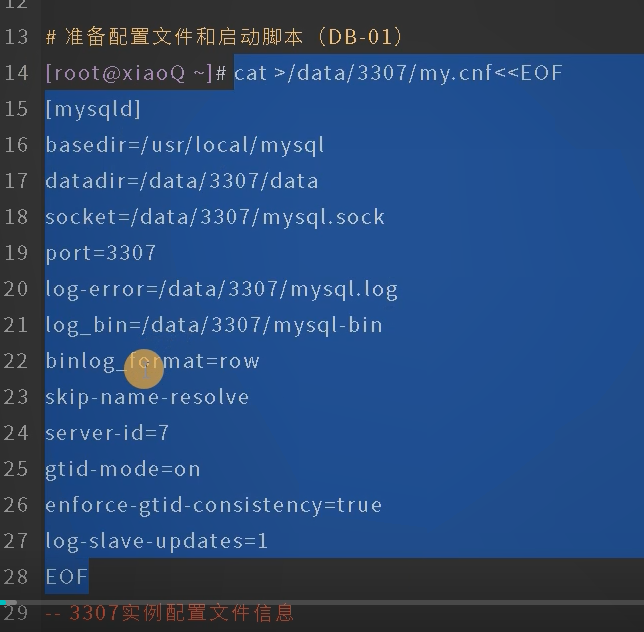
systemctl文件

MyCAT分布式存储主从环境架构(进行多实例主从与双主架构)
实现双主关系建立
# 实现双主关系建立(10.0.0.51:3307 <--> 10.0.0.52:3307)
mysql -S /data/3307/mysql.sock -e "create user repl@'10.0.0.%'" identified with
\mysql_native_password by '123';grant replication slave on *.* to repl@10.0.0.%;"  db02上进行
mysql -S /data/3307/mysql.sock -e "create user root@'10.0.0.%'" identified with
\mysql_native_password by 'root';grant all on *.* to repl@10.0.0.%;"  db02上进行

在db01数据库上进行操作
mysql -S /data/3307/mysql.sock -e "change master to master_host='10.0.0.52',master_port=3307\
,master_auto_position=1,master_user='repl',master_password='123';"
mysql -S /data/3307/mysql.sock -e "start slave;"
mysql -S /data/3307/mysql.sock -e "show slave status\G;" |grep Running;
在db02数据库上进行操作
mysql -S /data/3307/mysql.sock -e "change master to master_host='10.0.0.51',master_port=3307\
,master_auto_position=1,master_user='repl',master_password='123';"
mysql -S /data/3307/mysql.sock -e "start slave;"
mysql -S /data/3307/mysql.sock -e "show slave status\G;" |grep Running;
# 实现主从建立(10.0.0.51:3307 --> 10.0.0.51:3309)
mysql -S /data/3309/mysql.sock -e "change master to master_host='10.0.0.51',master_port=3307\
,master_auto_position=1,master_user='repl',master_password='123';"
mysql -S /data/3309/mysql.sock -e "start slave;"
mysql -S /data/3309/mysql.sock -e "show slave status\G;" |grep Running;
# 实现主从建立(10.0.0.52:3307 --> 10.0.0.52:3309)
mysql -S /data/3309/mysql.sock -e "change master to master_host='10.0.0.51',master_port=3307\
,master_auto_position=1,master_user='repl',master_password='123';"
mysql -S /data/3309/mysql.sock -e "start slave;"
mysql -S /data/3309/mysql.sock -e "show slave status\G;" |grep Running;
# 实现双主关系建立(10.0.0.51:3308 <--> 10.0.0.52:3308)
mysql -S /data/3308/mysql.sock -e "create user repl@'10.0.0.%'" identified with
\mysql_native_password by '123';grant replication slave on *.* to repl@10.0.0.%;"  db01上进行
mysql -S /data/3308/mysql.sock -e "create user root@'10.0.0.%'" identified with
\mysql_native_password by 'root';grant all on *.* to repl@10.0.0.%;"  db01上进行

在db02数据库上进行操作
mysql -S /data/3308/mysql.sock -e "change master to master_host='10.0.0.52',master_port=3307\
,master_auto_position=1,master_user='repl',master_password='123';"
mysql -S /data/3308/mysql.sock -e "start slave;"
mysql -S /data/3308 /mysql.sock -e "show slave status\G;" |grep Running;在db02数据库上进行操作
mysql -S /data/3307/mysql.sock -e "change master to master_host='10.0.0.51',master_port=3307\
,master_auto_position=1,master_user='repl',master_password='123';"
mysql -S /data/3307/mysql.sock -e "start slave;"
mysql -S /data/3307/mysql.sock -e "show slave status\G;" |grep Running;
# 实现主从建立(10.0.0.51:3307 --> 10.0.0.51:3309)
mysql -S /data/3309/mysql.sock -e "change master to master_host='10.0.0.51',master_port=3307\
,master_auto_position=1,master_user='repl',master_password='123';"
mysql -S /data/3309/mysql.sock -e "start slave;"
mysql -S /data/3309/mysql.sock -e "show slave status\G;" |grep Running;
# 实现主从建立(10.0.0.52:3307 --> 10.0.0.52:3309)
mysql -S /data/3309/mysql.sock -e "change master to master_host='10.0.0.51',master_port=3307\
,master_auto_position=1,master_user='repl',master_password='123';"
mysql -S /data/3309/mysql.sock -e "start slave;"
mysql -S /data/3309/mysql.sock -e "show slave status\G;" |grep Running;
异常同步错误充值方法
mysql -S /data/3307/mysql.sock -e "stop;reset slave all;"
mysql -S /data/3308/mysql.sock -e "stop;reset slave all;"
mysql -S /data/3309/mysql.sock -e "stop;reset slave all;"
mysql -S /data/3310/mysql.sock -e "stop;reset slave all;"
安装MYCAT软件层序