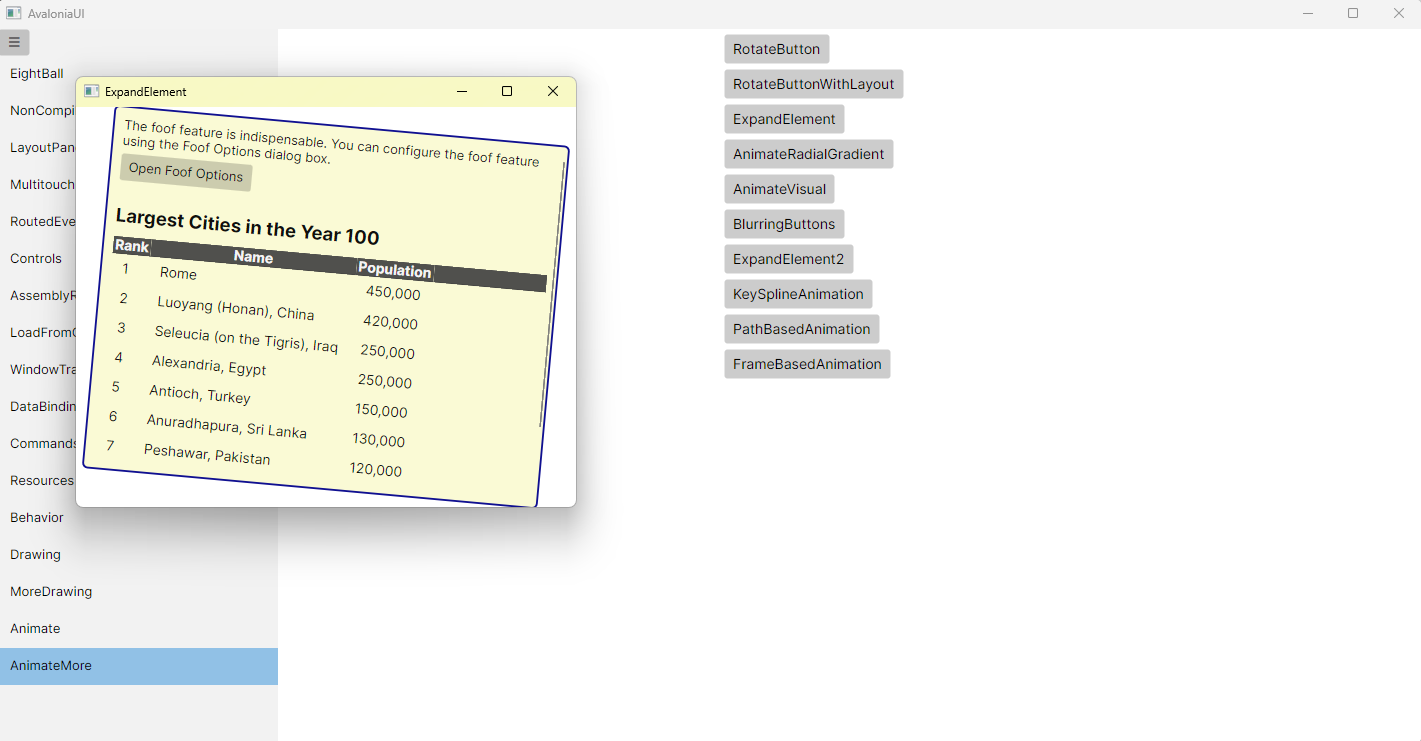
置顶的 C# Avalonia配置 已经更新
ExpandElement.axaml代码
<Window xmlns="https://github.com/avaloniaui"xmlns:x="http://schemas.microsoft.com/winfx/2006/xaml"xmlns:d="http://schemas.microsoft.com/expression/blend/2008"xmlns:mc="http://schemas.openxmlformats.org/markup-compatibility/2006"Width="500" Height="400"xmlns:local="using:AvaloniaUI"x:Class="AvaloniaUI.ExpandElement"x:DataType="local:ExpandElementViewModel"Title="ExpandElement"><Window.Styles><Style Selector="Border#element"><Style.Animations><!-- https://docs.avaloniaui.net/docs/reference/controls/datagrid/ --><Animation Duration="0:0:2.5" FillMode="Forward"><!-- 起始 --><KeyFrame Cue="0%"><Setter Property="Opacity" Value="0.2"/><Setter Property="ScaleTransform.ScaleX" Value="0"/><Setter Property="ScaleTransform.ScaleY" Value="0"/><Setter Property="RotateTransform.Angle" Value="70"/></KeyFrame><!-- 展开动画 --><KeyFrame Cue="80%"><Setter Property="Opacity" Value="1"/><Setter Property="ScaleTransform.ScaleX" Value="1"/><Setter Property="ScaleTransform.ScaleY" Value="1"/><Setter Property="RotateTransform.Angle" Value="0"/></KeyFrame><!-- 弹性缩放 --><KeyFrame Cue="90%"><Setter Property="ScaleTransform.ScaleX" Value="0.98"/><Setter Property="ScaleTransform.ScaleY" Value="0.98"/></KeyFrame><KeyFrame Cue="100%"><Setter Property="ScaleTransform.ScaleX" Value="1"/><Setter Property="ScaleTransform.ScaleY" Value="1"/></KeyFrame></Animation></Style.Animations></Style></Window.Styles><Grid><Border Name="element"Margin="3"Background="LightGoldenrodYellow"BorderBrush="DarkBlue"BorderThickness="2"CornerRadius="5"Opacity="0.2"><Border.RenderTransform><TransformGroup><ScaleTransform/><RotateTransform/></TransformGroup></Border.RenderTransform><ScrollViewer><StackPanel Margin="10"><TextBlock Text="The foof feature is indispensable. You can configure the foof feature using the Foof Options dialog box."TextWrapping="Wrap" /><Button Content="Open Foof Options"HorizontalAlignment="Left"Margin="0,5,0,15" /><TextBlock Text="Largest Cities in the Year 100"FontSize="20"FontWeight="Bold"Margin="0,10" /><DataGrid CanUserSortColumns="False"AutoGenerateColumns="False"ItemsSource="{Binding Cities}"><DataGrid.ColumnHeaderTheme><ControlTheme TargetType="DataGridColumnHeader"><Setter Property="Background" Value="#444" /><Setter Property="FontSize" Value="15"/><Setter Property="Foreground" Value="White" /><Setter Property="BorderThickness" Value="0"/><Setter Property="BorderBrush" Value="Transparent"/><Setter Property="FontWeight" Value="Bold" /><Setter Property="HorizontalContentAlignment" Value="Center"/><Setter Property="VerticalContentAlignment" Value="Center"/></ControlTheme></DataGrid.ColumnHeaderTheme><DataGrid.Columns><DataGridTextColumn Header="Rank" Binding="{Binding Rank}" /><DataGridTextColumn Header="Name" Binding="{Binding Name}" /><DataGridTextColumn Header="Population" Binding="{Binding Population}" /></DataGrid.Columns></DataGrid></StackPanel></ScrollViewer></Border>        </Grid>
</Window>
ExpandElement.axaml.cs代码
using Avalonia;
using Avalonia.Controls;
using CommunityToolkit.Mvvm.ComponentModel;
using System.Collections.ObjectModel;namespace AvaloniaUI;
public class City
{public int Rank { get; set; }public string? Name { get; set; }public string? Population { get; set; }
}public class ExpandElementViewModel : ObservableObject
{public ObservableCollection<City> Cities { get; set; } = new(){new City { Rank = 1, Name = "Rome", Population = "450,000" },new City { Rank = 2, Name = "Luoyang (Honan), China", Population = "420,000" },new City { Rank = 3, Name = "Seleucia (on the Tigris), Iraq", Population = "250,000" },new City { Rank = 4, Name = "Alexandria, Egypt", Population = "250,000" },new City { Rank = 5, Name = "Antioch, Turkey", Population = "150,000" },new City { Rank = 6, Name = "Anuradhapura, Sri Lanka", Population = "130,000" },new City { Rank = 7, Name = "Peshawar, Pakistan", Population = "120,000" },new City { Rank = 8, Name = "Carthage, Tunisia", Population = "100,000" },new City { Rank = 9, Name = "Suzhou, China", Population = "n/a" },new City { Rank = 10, Name = "Smyrna, Turkey", Population = "90,000" }};
}
public partial class ExpandElement : Window
{public ExpandElement(){InitializeComponent();this.DataContext = new ExpandElementViewModel();}
}
运行效果