一、概述
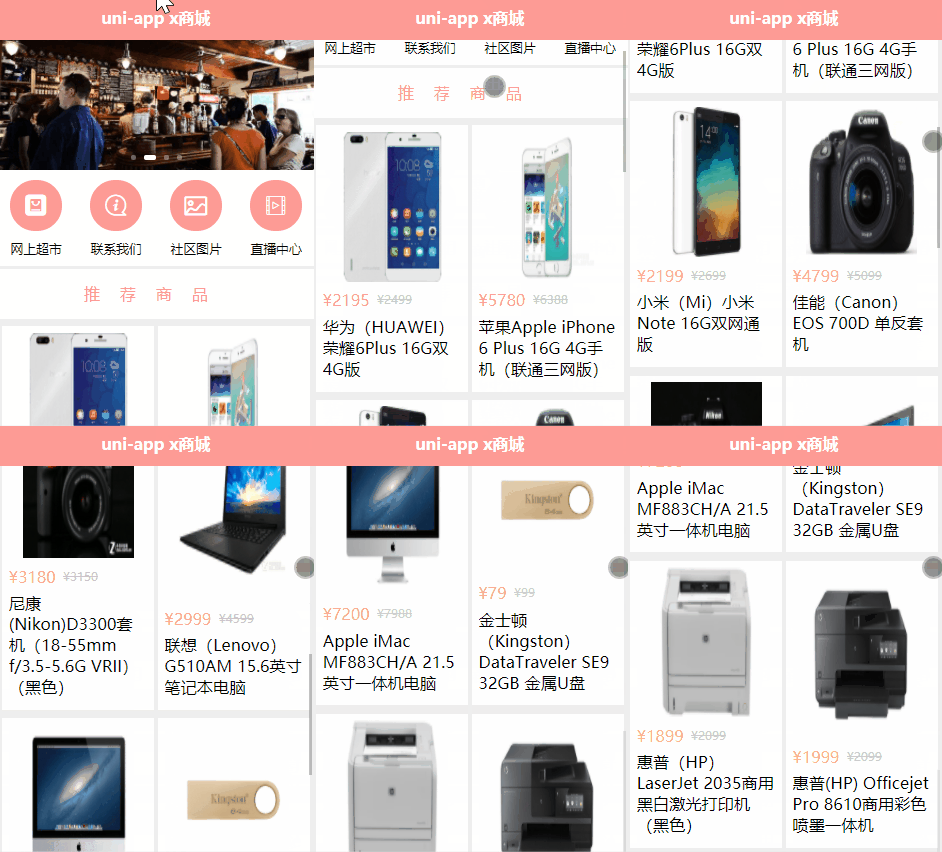
上一篇已经实现了Icon 图标显示,接下来,展示商品列表数据,效果如下:
二、布局页面
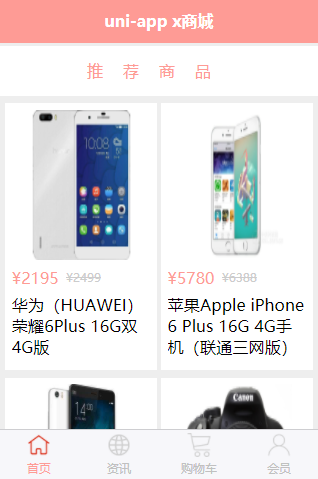
可以看到,显示为2列,每一列有2条数据。
这里依然使用flex布局,在开发的时候,我们可以在页面中,先把数据固定好,可以随意创造一些数据。
index.uvue代码如下:
<template><view class="home"><!-- 轮播区域 --><up-swiper :list="swiper" keyName="img" indicator indicatorMode="dot" circular></up-swiper><!-- 导航区域 --><view class="nav"><view class="nav_item"><view class="iconfont icon-ziyuan"></view><text>网上超市</text></view><view class="nav_item"><view class="iconfont icon-guanyuwomen"></view><text>联系我们</text></view><view class="nav_item"><view class="iconfont icon-tupian"></view><text>社区图片</text></view><view class="nav_item"><view class="iconfont icon-shipin"></view><text>直播中心</text></view></view><!-- 推荐商品 --><view class="hot_goods"><view class="tit">推荐商品</view><view class="goods_list"><view class="goods_item"><image src="https://imgservice.suning.cn/uimg1/b2c/image/mMW59YHxKzNvTLlsdDlbVg.jpg_800w_800h_4e"mode=""></image><view class="price"><text>¥2195</text>cd<text>¥2499</text></view><view class="name">华为(HUAWVEI)荣耀6Plus 16G双4G版</view></view><view class="goods_item"><image src="https://2d.zol-img.com.cn/product/140_1200x900/735/cectVc8eFTXa.jpg" mode=""></image><view class="price"><text>¥5780</text><text>¥6388</text></view><view class="name">苹果Apple iPhone 6 Plus 16G 4G手机(联通三网版)</view></view></view></view></view>
</template><script>export default {data() {return {swiper: [{id: 1,url: 'https://picsum.photos',img: 'https://picsum.photos/600/400?random=1'}, {id: 2,url: 'https://picsum.photos',img: 'https://picsum.photos/600/400?random=2'}, {id: 3,url: 'https://picsum.photos',img: 'https://picsum.photos/600/400?random=3'},{id: 4,url: 'https://picsum.photos',img: 'https://picsum.photos/600/400?random=4'}],}},methods: {}}
</script><style lang="scss">.home {swiper {width: 750rpx;height: 380rpx;image: {height: 100%;width: 100%;}}.nav {display: flex;flex-direction: row; //横向排列justify-content: space-around; //平均分布在一行
.nav_item {text-align: center;view {width: 120rpx;height: 120rpx;background: $shop-color;border-radius: 60rpx;margin: 10px auto;line-height: 120rpx;color: white;font-size: 50rpx;text-align: center;}.icon-tupian {font-size: 45rpx;}text {font-size: 30rpx;}}}.hot_goods {background: #eee;overflow: hidden;margin-top: 10px;.tit {height: 50px;line-height: 50px;color: $shop-color;text-align: center;letter-spacing: 20px;background: #fff;margin: 7rpx 0;}.goods_list {padding: 0 15rpx;display: flex;flex-direction: row; //横向排列flex-wrap: wrap;justify-content: space-between;.goods_item {background: #fff;width: 355rpx;margin: 10rpx 0;padding: 15rpx;box-sizing: border-box;image {width: 80%;height: 150px;display: block;margin: auto; //图片居中
                    }.price {display: flex;flex-direction: row;color: $shop-color;font-size: 36rpx;// margin-top: 15rpx;margin: 20rpx 0 5rpx 0;text:nth-child(2) {color: #ccc;font-size: 28rpx;margin-top: 5rpx;margin-left: 17rpx;text-decoration-line: line-through;}}.name {font-size: 38rpx;line-height: 50rpx;padding-bottom: 15rpx;padding-top: 10rpx;}}}}}
</style>
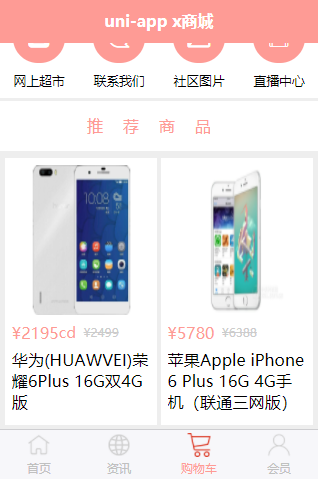
以上代码固定了2条数据,编译代码,效果如下:
三、调用api获取商品数据
上面固定了数据,只是为了调整样式,真正使用,还是要通过api接口获取数据。
需要自己搭建一个服务端,用来提供api接口。这里为了节省时间,直接使用现有的。
链接: https://pan.baidu.com/s/1lPrvZrzPszxHzCgbEysIzg?pwd=6e8k 提取码: 6e8k
下载shop_server.zip,根据readme.md文件说明,进行部署即可。
最后访问2个接口,如果显示没问题,那么就可以正式调用API接口了。
修改uni-app x项目下的utils/request.ts,修改变量baseURL
config.baseURL = 'http://localhost:8082' // api地址
修改index.uvue,改成api接口获取数据。
完整代码如下:
<template><view class="home"><!-- 轮播区域 --><up-swiper :list="swiper" keyName="img" indicator indicatorMode="dot" circular></up-swiper><!-- 导航区域 --><view class="nav"><view class="nav_item"><view class="iconfont icon-ziyuan"></view><text>网上超市</text></view><view class="nav_item"><view class="iconfont icon-guanyuwomen"></view><text>联系我们</text></view><view class="nav_item"><view class="iconfont icon-tupian"></view><text>社区图片</text></view><view class="nav_item"><view class="iconfont icon-shipin"></view><text>直播中心</text></view></view><!-- 推荐商品 --><view class="hot_goods"><view class="tit">推荐商品</view><view class="goods_list"><view class="goods_item" v-for="item in goods" :key="item.id"><image :src="item.img_url" mode=""></image><view class="price"><text>¥{{item.sell_price}}</text><text>¥{{item.market_price}}</text></view><view class="name">{{item.title}}</view></view></view></view></view>
</template><script>export default {data() {return {title: 'Hello',swiper: [],goods: []}},onLoad() {this.get_swiper()this.get_goods()},methods: {// 获取轮播图的数据
            async get_swiper() {try {const res = await this.$http.get('/api/getlunbo', {})// console.log("res", res)this.swiper = res.message} catch (err : any) {// console.error('获取轮播图失败', err)
                    uni.showToast({title: '获取轮播图失败' + err.statusCode,});}},// 获取热门商品列表数据
            async get_goods() {try {const res = await this.$http.get('/api/getgoods?pageindex=1', {})// console.log("res", res)this.goods = res.message} catch (err : any) {// console.error('获取轮播图失败', err)
                    uni.showToast({title: '获取热门商品列表失败' + err.statusCode,});}}}}
</script><style lang="scss">.home {swiper {width: 750rpx;height: 380rpx;image: {height: 100%;width: 100%;}}.nav {display: flex;flex-direction: row; //横向排列justify-content: space-around; //平均分布在一行
.nav_item {text-align: center;view {width: 120rpx;height: 120rpx;background: $shop-color;border-radius: 60rpx;margin: 10px auto;line-height: 120rpx;color: white;font-size: 50rpx;text-align: center;}.icon-tupian {font-size: 45rpx;}text {font-size: 30rpx;}}}.hot_goods {background: #eee;overflow: hidden;margin-top: 10px;.tit {height: 50px;line-height: 50px;color: $shop-color;text-align: center;letter-spacing: 20px;background: #fff;margin: 7rpx 0;}.goods_list {padding: 0 15rpx;display: flex;flex-direction: row; //横向排列flex-wrap: wrap;justify-content: space-between;.goods_item {background: #fff;width: 355rpx;margin: 10rpx 0;padding: 15rpx;box-sizing: border-box;image {width: 80%;height: 150px;display: block;margin: auto; //图片居中
                    }.price {display: flex;flex-direction: row;color: $shop-color;font-size: 36rpx;// margin-top: 15rpx;margin: 20rpx 0 5rpx 0;text:nth-child(2) {color: #ccc;font-size: 28rpx;margin-top: 5rpx;margin-left: 17rpx;text-decoration-line: line-through;}}.name {font-size: 38rpx;line-height: 50rpx;padding-bottom: 15rpx;padding-top: 10rpx;}}}}}
</style>
重新编译代码运行,整体效果如下: