

Combo-box Control - ComboExo example
Create a new ComboExo using VS2013
- MFC Application Wizard
- design dialog
- event
ComboExo example - visualc
The original example was written using VC6.0; now we will rewrite it using VS2013.
After downloading, click "Extract" to extract the source files.
Move files to the "res" directory:
- res/ComboExo.ico
- res/ComboExo.rc2
Recompile with Visual Studio 2015+
D8016 '/ZI' and '/Gy-' command-line options are incompatible
C/C++ -> General -> Debug Information Format
Program Database(/Zi)
MFC Application Wizard
- Application Type
- User Interface Features
default
- Advanced Features
Cancel All
Application Type - Dialog based
- Project style:
MFC standard
- Dialog based options:
none
design dialog
Drag and drop from the toolbox:
- Combo box
- Edit Control
List height
There are two ways to adjust the list height:
- Drag the "down arrow"
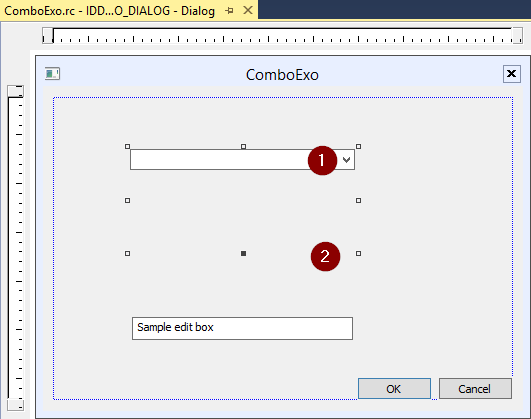
- Configure the rc file
Original data:
COMBOBOX IDC_COMBO1,58,39,48,30,CBS_DROPDOWN | CBS_SORT | WS_VSCROLL | WS_TABSTOP
new data: Height of the 4 items
COMBOBOX IDC_COMBO1,58,39,48,48,CBS_DROPDOWN | CBS_SORT | WS_VSCROLL | WS_TABSTOP
event
- CBN_SELCHANGE
IDC_COMBO1 -> Properties
- OnInitXXX
CBN_SELCHANGE
Click the "CBN_SELCHANGE" event property and select "

void CComboExoDlg::OnCbnSelchangeCombo1()
{// TODO: Add your control notification handler code hereCString strTemp;int nCurSel;nCurSel = ((CComboBox*)GetDlgItem(IDC_COMBO1))->GetCurSel();((CComboBox*)GetDlgItem(IDC_COMBO1))->GetLBText(nCurSel, strTemp);GetDlgItem(IDC_EDIT1)->SetWindowText(strTemp);
}
OnInitDialog()
// Add 20 items to the combo box.
CString str;
for (int i = 0; i < 20; i++)
{str.Format(_T("item string %d"), i);((CComboBox*)GetDlgItem(IDC_COMBO1))->AddString(str);
}