学习建议:
1.从Demo开始:运行官方Demo,玩遍每一个功能,看看它是如何实现的。
2.动手实践:在自己的一个小项目中应用它,从改造MetroWindow和设置主题开始
3.逐个攻克:依次自学习一个控件(比如先学会用Flyout,再学HamburgerMenu),不要试图一下子掌握所有内容
4.善用搜索引擎:遇到问题时,搜索"MahApps.Metro[你的问题]",通常能在StackOverFlow或 GitHub lssus中找到答案
1.安装框架 install-package MahApps.Metro
2.设置资源字典
-
说明:Controls.xaml 和Fonts 是必须的核心样式
-
Themes/Light.Blue.xaml 定义了主题和配色,你可以将其改为Dark.Blue.xaml或Light.Red.xaml
<Application.Resources><ResourceDictionary><ResourceDictionary.MergedDictionaries><!--MahApps.Metro核心样式和主题--><ResourceDictionary Source="pack://application:,,,/MahApps.Metro;component/Styles/Controls.xaml" /><ResourceDictionary Source="pack://application:,,,/MahApps.Metro;component/Styles/Fonts.xaml" /><!--主题(Accent)和基础主题(Base Theme:Light/Dark)--><ResourceDictionary Source="pack://application:,,,/MahApps.Metro;component/Styles/Themes/Light.Blue.xaml" /></ResourceDictionary.MergedDictionaries></ResourceDictionary></Application.Resources>
3.修改窗体类
引用命名空间: xmlns:controls="http://metro.mahapps.com/winfx/xaml/controls"
修改窗体
4.修改后台代码
引用命名空间:using MahApps.Metro.Controls
基类由Window 改为MetroWindow
运行: 通过以上步骤可以看出,框架的使用和其他类似框架一样。
Demo1-Metro.Flyout 使用
-
Flyout 是一种飞入式伸缩窗口,类似抽屉。在很多UI设计中为解决界面杂乱臃肿和多种功能集成调用设计中起到简化UI设计又兼备多种功能的集成提供了很好的设计模式和借鉴。
示例:
-
XAML:
<mah:MetroWindow x:Class="WpfApp1.MainWindow"xmlns="http://schemas.microsoft.com/winfx/2006/xaml/presentation"xmlns:x="http://schemas.microsoft.com/winfx/2006/xaml"xmlns:d="http://schemas.microsoft.com/expression/blend/2008"xmlns:mc="http://schemas.openxmlformats.org/markup-compatibility/2006"xmlns:local="clr-namespace:WpfApp1"xmlns:mah="http://metro.mahapps.com/winfx/xaml/controls"xmlns:pu="clr-namespace:Panuon.UI.Silver;assembly=Panuon.UI.Silver"mc:Ignorable="d"Title="MainWindow" Height="420" Width="600"WindowStartupLocation="CenterScreen"><mah:MetroWindow.Flyouts><mah:FlyoutsControl><mah:Flyout x:Name="FirstFlyout" Header="设置" Position="Right" Width="250"></mah:Flyout><mah:Flyout x:Name="f2" Header="设置"  IsOpen="{Binding IsOpen}" Position="Right" Width="300"><StackPanel Margin="20" Orientation="Vertical"><Button Content="打开" Width="80" Height="30" Margin="5"/><Button Content="修改" Width="80" Height="30" Margin="5"/><Button Content="保存" Width="80" Height="30" Margin="5"/><mah:ToggleSwitch Header="蓄电池闸刀" OffContent="断开" OnContent="闭合" /><mah:ToggleSwitch Header="启机按钮" OffContent="停机" OnContent="启机" /><mah:ProgressRing x:Name="progress" Height="50" Width="50"/></StackPanel></mah:Flyout></mah:FlyoutsControl></mah:MetroWindow.Flyouts><Grid><Grid.ColumnDefinitions><ColumnDefinition Width="Auto"/><ColumnDefinition /></Grid.ColumnDefinitions><StackPanel Orientation="Vertical" Margin="2 10"><Button Width="100"  Command="{Binding OpenSet}" Height="30" Margin="10 5" Content="Flyout" /><Button Width="100" Margin="10 5"Height="30"Style="{StaticResource MahApps.Styles.Button}"Content="消息"Command="{Binding FoolMessageCommand}"/></StackPanel></Grid>
</mah:MetroWindow>-
Code
using MahApps.Metro.Controls;
using MahApps.Metro.Controls.Dialogs;
using WpfApp1.ViewModels;
namespace WpfApp1
{/// <summary>/// MainWindow.xaml 的交互逻辑/// </summary>public partial class MainWindow : MetroWindow{private MainViewModel main;public MainWindow(){InitializeComponent();main = new MainViewModel(DialogCoordinator.Instance);DataContext = main;}}
}using CommunityToolkit.Mvvm.ComponentModel;
using CommunityToolkit.Mvvm.Input;
using MahApps.Metro.Controls.Dialogs;
using System.Threading.Tasks;
using System.Windows.Input;namespace WpfApp1.ViewModels
{public class MainViewModel : ObservableObject{private IDialogCoordinator dialogCoordinator;private bool isopen;public bool IsOpen{get => isopen;set => SetProperty(ref isopen, value);}private ICommand openSet;public ICommand OpenSet{get{if (openSet == null){openSet = new RelayCommand(() =>{IsOpen = true;});}return openSet;}}private ICommand foolMessage;public ICommand FoolMessageCommand{get{if (foolMessage == null){foolMessage = new RelayCommand(() =>{FoolMessage();});}return foolMessage;}}//该框架内涵依赖注入功能,可以直接在构造函数中注入IDialogCoordinatorpublic MainViewModel(IDialogCoordinator dialogCooldinatorParam){openSet = new RelayCommand(() =>{IsOpen = true;});dialogCoordinator = dialogCooldinatorParam;}public async Task ShowMessageAsync(string title, string message){await dialogCoordinator.ShowMessageAsync(this, title, message);}public async void FoolMessage(){await dialogCoordinator?.ShowMessageAsync(this, "标题", "内容");}}
}
using CommunityToolkit.Mvvm.ComponentModel;
using CommunityToolkit.Mvvm.Input;
using MahApps.Metro.Controls.Dialogs;
using System.Threading.Tasks;
using System.Windows.Input;namespace WpfApp1.ViewModels
{public class MainViewModel : ObservableObject{private IDialogCoordinator dialogCoordinator;private bool isopen;public bool IsOpen{get => isopen;set => SetProperty(ref isopen, value);}private ICommand openSet;public ICommand OpenSet{get{if (openSet == null){openSet = new RelayCommand(() =>{IsOpen = true;});}return openSet;}}private ICommand foolMessage;public ICommand FoolMessageCommand{get{if (foolMessage == null){foolMessage = new RelayCommand(() =>{FoolMessage();});}return foolMessage;}}//该框架内涵依赖注入功能,可以直接在构造函数中注入IDialogCoordinatorpublic MainViewModel(IDialogCoordinator dialogCooldinatorParam){openSet = new RelayCommand(() =>{IsOpen = true;});dialogCoordinator = dialogCooldinatorParam;}public async Task ShowMessageAsync(string title, string message){await dialogCoordinator.ShowMessageAsync(this, title, message);}public async void FoolMessage(){await dialogCoordinator?.ShowMessageAsync(this, "标题", "内容");}}
}-
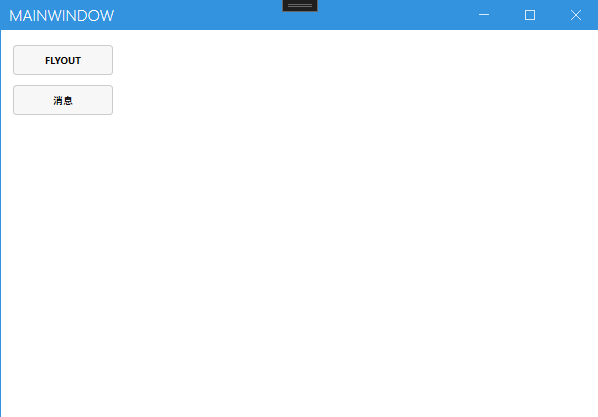
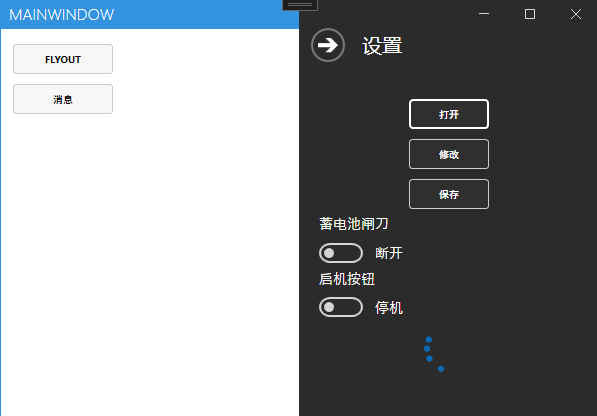
效果: