

作业一
代码及其结果展示
点击查看代码
from selenium import webdriver
from selenium.webdriver.firefox.service import Service
from selenium.webdriver.firefox.options import Options
from selenium.webdriver.common.by import By
from selenium.webdriver.support.ui import WebDriverWait
from selenium.webdriver.support import expected_conditions as EC
import pymysql
import time
import re
import os
from datetime import datetime
import json# 1. 定义数值解析逻辑
def parse_value(text):if not text or text.strip() in ['-', '--', '']:return 0.00text = text.strip()if '万' in text:cleaned = re.sub(r'[^\d.-]', '', text)num = float(cleaned)return round(num / 10000, 4)elif '亿' in text:cleaned = re.sub(r'[^\d.-]', '', text)num = float(cleaned)return round(num, 4)elif '%' in text:cleaned = re.sub(r'[^\d.-]', '', text)num = float(cleaned)return round(num, 2)else:cleaned = re.sub(r'[^\d.-]', '', text)if cleaned:num = float(cleaned)return round(num / 10000, 4)else:return 0.00# 2. 初始化数据库
# 获取数据库连接
conn = pymysql.connect(host='localhost',port=3306,user='root',password='123456',database='stock_db',charset='utf8mb4',cursorclass=pymysql.cursors.DictCursor
)
cursor = conn.cursor()# 创建股票信息表
cursor.execute("""
CREATE TABLE IF NOT EXISTS stock_info (id BIGINT AUTO_INCREMENT PRIMARY KEY,stock_code VARCHAR(20) NOT NULL,stock_name VARCHAR(100) NOT NULL,latest_price DECIMAL(20,6),price_change_rate DECIMAL(15,6),price_change_amount DECIMAL(20,6),volume DECIMAL(25,6),turnover DECIMAL(25,6),amplitude DECIMAL(15,6),highest_price DECIMAL(20,6),lowest_price DECIMAL(20,6),opening_price DECIMAL(20,6),previous_close DECIMAL(20,6),plate VARCHAR(50),crawl_time DATETIME DEFAULT CURRENT_TIMESTAMP,update_time DATETIME DEFAULT CURRENT_TIMESTAMP ON UPDATE CURRENT_TIMESTAMP,UNIQUE KEY uk_stock_plate (stock_code, plate)
) ENGINE=InnoDB DEFAULT CHARSET=utf8mb4;
""")# 创建日志表
cursor.execute("""
CREATE TABLE IF NOT EXISTS crawl_log (id INT AUTO_INCREMENT PRIMARY KEY,plate VARCHAR(50) NOT NULL,crawl_date DATETIME DEFAULT CURRENT_TIMESTAMP,data_count INT NOT NULL,status VARCHAR(20) DEFAULT 'success',error_msg TEXT
) ENGINE=InnoDB DEFAULT CHARSET=utf8mb4;
""")
conn.commit()
cursor.close()
conn.close()# 3. 配置Firefox浏览器
options = Options()
firefox_paths = [r'C:\Program Files\Mozilla Firefox\firefox.exe',r'C:\Program Files (x86)\Mozilla Firefox\firefox.exe'
]
for path in firefox_paths:if os.path.exists(path):options.binary_location = pathbreakoptions.add_argument("--start-maximized")driver_path = r'C:\Users\27387\PycharmProjects\PythonProject\.venv\Scripts\geckodriver.exe'
if not os.path.exists(driver_path):driver_path = './geckodriver.exe'driver = webdriver.Firefox(service=Service(driver_path),options=options
)
driver.set_page_load_timeout(60)# 4. 爬取各板块数据
plates = [{"url": "http://quote.eastmoney.com/center/gridlist.html#hs_a_board", "name": "沪深京A股"},{"url": "http://quote.eastmoney.com/center/gridlist.html#sh_a_board", "name": "上证A股"},{"url": "http://quote.eastmoney.com/center/gridlist.html#sz_a_board", "name": "深证A股"}
]for plate in plates:print(f"\n爬取【{plate['name']}】...")driver.get(plate["url"])time.sleep(8)# 提取股票数据stock_list = []WebDriverWait(driver, 20).until(EC.presence_of_element_located((By.XPATH, "//div[@class='quotetable']//table")))rows = driver.find_elements(By.XPATH, "//div[@class='quotetable']//table//tbody/tr")for row in rows:cols = row.find_elements(By.TAG_NAME, "td")col_texts = [col.text.strip() for col in cols if col.text.strip()]if len(col_texts) < 13:continuestock_info = {"stock_code": col_texts[1],"stock_name": col_texts[2],"latest_price": parse_value(col_texts[4]),"price_change_rate": parse_value(col_texts[5]),"price_change_amount": parse_value(col_texts[6]),"volume": parse_value(col_texts[7]),"turnover": parse_value(col_texts[8]),"amplitude": parse_value(col_texts[9]),"highest_price": parse_value(col_texts[10]),"lowest_price": parse_value(col_texts[11]),"opening_price": parse_value(col_texts[12]),"previous_close": parse_value(col_texts[13]),"plate": plate_name}if stock_info["stock_code"] and len(stock_info["stock_code"]) >= 6:stock_list.append(stock_info)# 保存数据到数据库(原save_stock_data_to_db函数内容)if stock_list:conn = pymysql.connect(host='localhost',port=3306,user='root',password='123456',database='stock_db',charset='utf8mb4',cursorclass=pymysql.cursors.DictCursor)cursor = conn.cursor()insert_sql = """INSERT INTO stock_info (stock_code, stock_name, latest_price, price_change_rate,price_change_amount, volume, turnover, amplitude,highest_price, lowest_price, opening_price, previous_close, plate) VALUES (%s, %s, %s, %s, %s, %s, %s, %s, %s, %s, %s, %s, %s)ON DUPLICATE KEY UPDATEstock_name = VALUES(stock_name),latest_price = VALUES(latest_price),price_change_rate = VALUES(price_change_rate),price_change_amount = VALUES(price_change_amount),volume = VALUES(volume),turnover = VALUES(turnover),amplitude = VALUES(amplitude),highest_price = VALUES(highest_price),lowest_price = VALUES(lowest_price),opening_price = VALUES(opening_price),previous_close = VALUES(previous_close),update_time = CURRENT_TIMESTAMP"""data_list = [(s['stock_code'], s['stock_name'], s['latest_price'], s['price_change_rate'],s['price_change_amount'], s['volume'], s['turnover'], s['amplitude'],s['highest_price'], s['lowest_price'], s['opening_price'], s['previous_close'], s['plate']) for s in stock_list]cursor.executemany(insert_sql, data_list)cursor.execute("INSERT INTO crawl_log (plate, data_count) VALUES (%s, %s)",(plate['name'], len(stock_list)))conn.commit()cursor.close()conn.close()print(f"成功爬取 {len(stock_data)} 条数据")else:print("未提取到任何数据")# 5. 关闭浏览器
driver.quit()
print("\n所有板块爬取完成!")

心得体会
Selenium 在处理 Ajax 动态加载的网页时展现出独特优势。相较于传统爬虫库,它能模拟浏览器渲染页面,解决了股票数据异步加载难以直接抓取的问题,而合理运用显式等待(WebDriverWait)则有效避免了元素未加载完成导致的定位失败,让我深刻体会到 “等待” 在动态网页爬取中的核心作用。
此次实践让我将理论知识落地,既掌握了 Selenium 处理动态页面的核心技巧,也理解了数据爬取到存储全流程的逻辑,更认识到编程实践中严谨和复盘的重要性,为后续处理更复杂的爬虫场景积累了宝贵经验。
作业二
代码及其结果展示
点击查看代码
from selenium import webdriver
from selenium.webdriver.common.by import By
from selenium.webdriver.firefox.service import Service
from selenium.webdriver.support.wait import WebDriverWait
from selenium.webdriver.support import expected_conditions as EC
import time
import pymysqloptions = webdriver.FirefoxOptions()
# 反爬配置
options.set_preference("dom.webdriver.enabled", False)
options.add_argument('--disable-blink-features=AutomationControlled')
options.add_argument("--disable-blink-features=AutomationControlled")
options.add_argument('--no-sandbox')
# 指定geckodriver路径
service = Service(r"C:\Users\27387\PycharmProjects\PythonProject\.venv\Scripts\geckodriver.exe")
driver = webdriver.Firefox(service=service, options=options)
driver.maximize_window()# 数据库连接
db = pymysql.connect(host='127.0.0.1', user='root', password='123456', port=3306, database='mooc_db')
cursor = db.cursor()
cursor.execute('DROP TABLE IF EXISTS courseMessage')
sql = '''CREATE TABLE courseMessage(cCourse varchar(64),cCollege varchar(64),cTeacher varchar(16),cTeam varchar(256),cCount varchar(16),
cProcess varchar(32),cBrief varchar(2048))'''
cursor.execute(sql)def spiderOnePage():time.sleep(3)courses = driver.find_elements(By.XPATH, '//*[@id="channel-course-list"]/div/div/div[2]/div[1]/div')current_window_handle = driver.current_window_handlefor course in courses:cCourse = course.find_element(By.XPATH, './/h3').text  # 提取课程名称cCollege = course.find_element(By.XPATH, './/p[@class="_2lZi3"]').text  # 提取院校cTeacher = course.find_element(By.XPATH, './/div[@class="_1Zkj9"]').text  # 提取老师cCount = course.find_element(By.XPATH, './/div[@class="jvxcQ"]/span').text  # 提取学校人数cProcess = course.find_element(By.XPATH, './/div[@class="jvxcQ"]/div').text  # 提取课程进度course.click()Handles = driver.window_handlesif len(Handles) < 2:continuedriver.switch_to.window(Handles[1])time.sleep(3)# 提取课程详情cBrief = driver.find_element(By.XPATH, '//*[@id="j-rectxt2"]').text  # 先通过固定ID找简介if len(cBrief) == 0:cBriefs = driver.find_elements(By.XPATH, '//*[@id="content-section"]/div[4]/div//*')  # 获取简介区块下的所有子元素cBrief = ""for c in cBriefs:cBrief += c.textcBrief = cBrief.replace('"', r'\"').replace("'", r"\'")cBrief = cBrief.strip()nameList = []cTeachers = driver.find_elements(By.XPATH, '//div[@class="um-list-slider_con_item"]')  # 提取授课团队for Teacher in cTeachers:name = Teacher.find_element(By.XPATH, './/h3[@class="f-fc3"]').text.strip()nameList.append(name)nextButton = driver.find_elements(By.XPATH, '//div[@class="um-list-slider_next f-pa"]')  # 提取下一页按钮while len(nextButton) != 0:nextButton[0].click()time.sleep(3)cTeachers = driver.find_elements(By.XPATH, '//div[@class="um-list-slider_con_item"]')for Teacher in cTeachers:name = Teacher.find_element(By.XPATH, './/h3[@class="f-fc3"]').text.strip()nameList.append(name)nextButton = driver.find_elements(By.XPATH, '//div[@class="um-list-slider_next f-pa"]')cTeam = ','.join(nameList)# 关闭详情页driver.close()driver.switch_to.window(current_window_handle)# 插入数据库cursor.execute('INSERT INTO courseMessage VALUES ("%s","%s","%s","%s","%s","%s","%s")' % (cCourse, cCollege, cTeacher, cTeam, cCount, cProcess, cBrief))db.commit()driver.get('https://www.icourse163.org/')
driver.get(WebDriverWait(driver, 10, 0.48).until(EC.presence_of_element_located((By.XPATH, '//*[@id="app"]/div/div/div[1]/div[1]/div[1]/span[1]/a'))).get_attribute('href'))
spiderOnePage()
count = 1
# 翻页逻辑
next_page = driver.find_element(By.XPATH, '//*[@id="channel-course-list"]/div/div/div[2]/div[2]/div/a[10]')
while next_page.get_attribute('class') == '_3YiUU ':if count == 2:breakcount += 1next_page.click()spiderOnePage()next_page = driver.find_element(By.XPATH, '//*[@id="channel-course-list"]/div/div/div[2]/div[2]/div/a[10]')# 关闭数据库连接
cursor.close()
db.close()time.sleep(3)
driver.quit()

心得体会
在爬取过程中遇到爬取多个任课老师遗漏的问题,采取循环,每次都重新定位到成员卡片位置,直到找不到下一个数据为止,然后再用逗号拼接字符串。
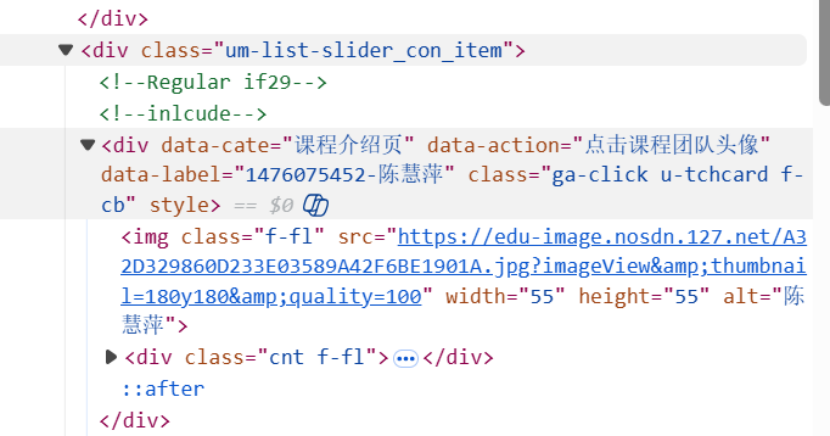

在爬虫实现层面,我深刻体会到 Selenium 处理动态交互场景的优势:模拟用户点击课程卡片、切换浏览器窗口、点击团队成员翻页按钮等操作,完美解决了 Ajax 异步加载的课程简介、授课团队等数据无法直接抓取的问题;而显式等待的合理运用,有效规避了元素加载延迟导致的定位失败,让我意识到 “精准等待” 是提升爬虫稳定性的关键。同时,XPath 定位的细节处理(如相对路径、多场景适配课程简介提取),也让我掌握了动态页面元素定位的核心技巧。
作业三
Python脚本生成测试数据

Kafka配置成功

安装flume运行环境

测试flume,kafka通道


gitee链接:https://gitee.com/lai-yixuan/2025_crawl_project/tree/master/作业4